Why Queues Belong Between Systems That Don’t Fail the Same Way#
In e-commerce, the order lifecycle almost never lives in one system.
Magento may own the storefront. SAP may own financials, inventory, or offline order entry. A WMS may own fulfillment. AfterShip may own tracking, delivery visibility, and AI delivery estimates. Customer emails may depend on all of the above being correct enough to send something useful.
That sounds clean on an architecture diagram.
In reality, each system fails differently.
SAP can accept an order with missing address data. Magento may require a country code before it can safely present that order to a customer. A WMS may be temporarily unavailable. AfterShip may receive tracking data later than expected. A retry job may keep hammering the same bad record forever because no one taught it the difference between “try again later” and “this payload is invalid.”
That is where queues belong.
Not because queues are trendy.
Not because every integration needs an event-driven architecture diagram with twelve boxes and a keynote-friendly arrow cloud.
Queues belong between systems that do not fail the same way.
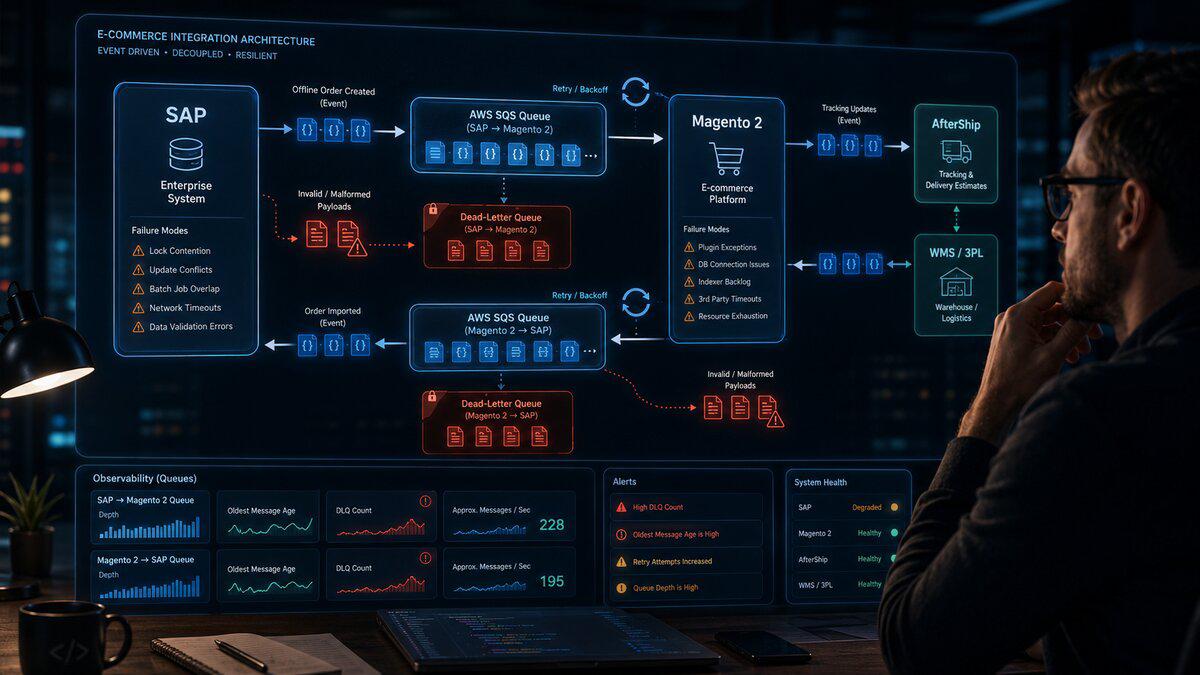
In my case, the practical answer is AWS SQS FIFO with dead-letter queues, validation, per-order sequencing, idempotent consumers, and clear ownership boundaries between SAP, Magento 2, AfterShip, and the rest of the e-commerce stack.
The Problem: Direct Integrations Assume Too Much#
A lot of internal system integrations start simple.
One system has data. Another system needs data. So we move the data.
Maybe that starts as an API call. Maybe it is a database table. Maybe it is a scheduled job. Maybe it is a temporary MongoDB collection because the need appeared late in a project and MongoDB could accept simple JSON quickly without forcing a schema discussion in the middle of a deadline.
That kind of decision can be completely reasonable at the time.
The problem is what happens after the deadline passes.
One of the flows this applies to is offline orders. These are orders created outside of Magento’s normal storefront path, such as phone orders or EDI orders. SAP knows about them first. Magento still needs to know about them so the customer can see those orders in their account and have a consistent experience.
The rough flow looks like this:
| |
We also have the reverse direction:
| |
That second flow matters because SAP needs to be aware of orders and inventory-impacting activity originating from the e-commerce side. AfterShip then helps handle the delivery communication layer: tracking, shipment visibility, and estimated delivery intelligence.
The issue is not that these flows are complicated.
The issue is that these systems have different rules.
SAP may allow data that Magento should reject. Magento may be stricter about customer-facing order presentation. AfterShip may need tracking context that does not exist yet. One service may be down temporarily while another continues accepting data. One error may be retryable. Another may require a human to fix the source record.
When those cases are all treated the same, the integration becomes fragile.
The Failure Mode That Made This Obvious#
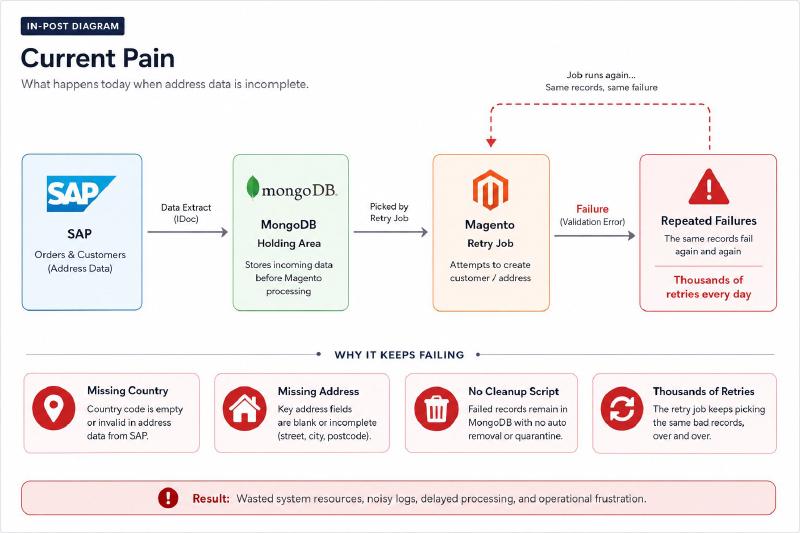
The clearest example was bad order data.
SAP allowed orders to exist with incomplete address information. In some cases, addresses were missing a country. In worse cases, the address itself was not usable.
That may be acceptable, or at least possible, in SAP depending on how the order was created. But Magento is customer-facing. It cannot safely present every malformed record as if it were a valid order. It needs enough structure to display the order, associate it with the customer, support downstream logic, and avoid breaking account pages or fulfillment-related processes.
The temporary integration path used a MongoDB database as a holding area. That made sense during the original project because the need came up late, MongoDB is schemaless, and accepting JSON quickly is one of the things MongoDB is very good at.
But over time, the side effect became painful:
- Bad data made it into the integration layer.
- The database became another operational component to manage.
- There was no clean dead-letter queue concept.
- There was no first-class distinction between retryable failures and invalid payloads.
- Without a proper cleanup script, Magento kept retrying bad rows.
- Eventually, thousands of invalid records could be retried over and over again.
That last part is the real problem.
A retry system that does not know when to stop is not resilience. It is an infinite loop with infrastructure around it.
Databases Are Not Queues#
This is one of those lessons that sounds obvious until you are staring at a table full of stuck integration records.
A database can hold work.
That does not make it a queue.
A real queue gives you behavior that a normal database table or document collection does not give you by default.
With SQS, I get:
- A managed buffer between producers and consumers.
- Visibility timeouts so one worker owns a message temporarily.
- Automatic message reappearance if the worker crashes or fails.
- Dead-letter queues after a defined number of failed receives.
- Message retention without building cleanup logic from scratch.
- CloudWatch metrics for queue depth, age, and failure behavior.
- Redrive workflows for replaying messages after fixes.
- Decoupling between systems that may be up, down, slow, or malformed independently.
A database table can approximate some of that, but then I have to build the queue behavior myself.
That usually means inventing fields like:
| |
Then I need cleanup jobs, lock expiration logic, stuck record detection, retry backoff, alerting, concurrency handling, and a way to stop poison records from being retried forever.
At that point, I am not using a database because it is the best tool.
I am building a worse version of a queue.
Why I Would Use AWS SQS FIFO Here#
There are plenty of queue systems that can work here.
RabbitMQ, Kafka, Redis streams, database-backed job systems, and managed event buses all have legitimate use cases.
For this particular problem, I would use AWS SQS FIFO.
The requirement is not stream analytics. It is not massive fanout. It is not a high-throughput clickstream. It is not an excuse to run Kafka just because the architecture diagram would look more impressive.
The requirement is durable, boring, operationally simple message buffering between business systems where order lifecycle events matter.
That last part is why FIFO matters.
For generic background jobs, standard SQS queues are often fine. But SAP-to-Magento offline orders and Magento-to-SAP order exports are not anonymous background jobs. They represent customer-visible order state and inventory-impacting business activity.
For these flows, I care about:
- Keeping events for the same order in sequence.
- Preventing obvious duplicate messages from being introduced into the queue.
- Avoiding race conditions between order-created, order-updated, shipment, cancellation, or correction events.
- Making each order its own ordered processing lane.
- Still allowing different orders to process in parallel.
- Keeping the operational model simple enough to run without building a science project.
That is a strong fit for SQS FIFO.
The important nuance is this:
FIFO improves the queue contract. It does not remove the need for idempotent consumers.
A FIFO queue can help with message ordering and deduplication at the queue layer, but it cannot guarantee that SAP, Magento, AfterShip, or any other downstream system did not already perform a business action before a worker crashed.
So the architecture needs both:
| |
Those are not competing ideas. They solve different parts of the reliability problem.
FIFO Does Not Replace Idempotency#
This is worth being direct about.
FIFO queues reduce duplicate and ordering problems, but consumers still need discipline.
Imagine this flow:
| |
From SQS’s point of view, the message was not completed because it was not deleted.
From SAP’s point of view, the order may already exist.
That means the consumer still needs to ask:
| |
For SAP-to-Magento, the same principle applies:
| |
FIFO helps prevent certain duplicate messages from being accepted into the queue. It helps preserve order within a message group. It helps make the integration more predictable.
But the consumer still has to protect the business operation.
That means unique idempotency keys, processed-message tracking, downstream lookup checks, or some combination of those.
The rule is simple:
The queue can protect message flow. The consumer must protect business side effects.
The Architecture I Would Use#
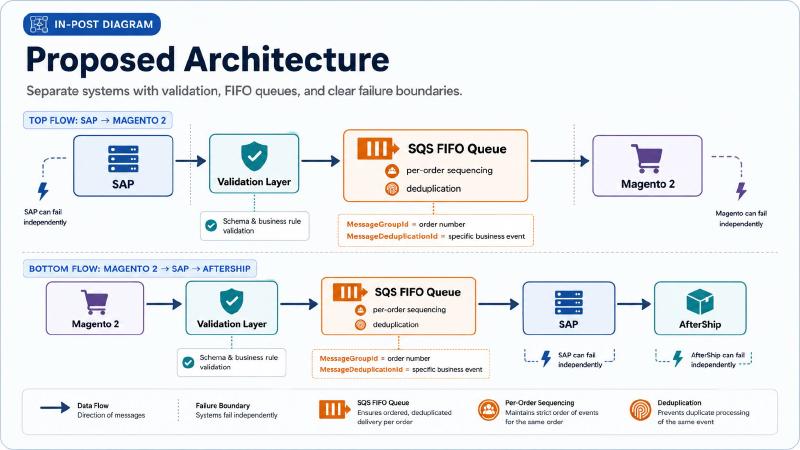
For this kind of integration, I would split the flows into two FIFO queues.
One FIFO queue handles SAP-to-Magento offline orders.
The other FIFO queue handles Magento-to-SAP order export.
| |
And the reverse direction:
| |
Each FIFO queue gets its own dead-letter queue.
| |
That matters because failures in one direction should not block the other direction.
A bad offline phone order from SAP should not interfere with Magento exporting valid e-commerce orders back to SAP. A temporary SAP API issue should not prevent Magento from continuing to accept orders. A malformed payload should not be retried forever just because the consumer sees “not processed yet.”
Each flow deserves its own contract, queue, failure policy, and replay story.
Message Group Design Matters#
The biggest mistake with FIFO queues is using one global message group.
Do not do this:
| |
Or this:
| |
That technically works, but it serializes too much work. Every message in the group must be processed in order. If one message is slow or stuck, everything behind it in that same group waits.
For order workflows, the better approach is to group by order.
For SAP-to-Magento offline orders:
| |
For Magento-to-SAP order export:
| |
That gives me the ordering I actually care about:
| |
This is the key to using FIFO without creating an unnecessary bottleneck.
I do not need every order in the entire business to process one at a time.
I need each individual order’s lifecycle to be consistent.
Deduplication ID Design#
The second important FIFO decision is the deduplication ID.
For SAP-to-Magento, a simple offline order created event might use:
| |
For Magento-to-SAP order export:
| |
If the same order can emit multiple meaningful events, the event type should be part of the deduplication ID:
| |
For example:
| |
The goal is to deduplicate accidental duplicate submissions without collapsing distinct business events into one message.
That distinction matters.
If two messages represent the same business action, they should deduplicate.
If two messages represent different business actions for the same order, they should both be processed in order.
The Most Important Rule: Validate Before the Queue#
One mistake I would avoid is treating SQS as a junk drawer.
The queue should not become the place where completely unvalidated payloads go to die.
For SAP-to-Magento offline orders, the validation layer should happen before the message is accepted as real work. That does not mean the payload has to be perfect in every business sense, but it should meet a minimum contract.
For example:
| |
Before that message goes to SQS, I want to know basic things:
- Is there a SAP order number?
- Is there an idempotency key?
- Is there a customer identifier, such as email or customer ID?
- Is there an address?
- Is the country present?
- Are required address fields present?
- Are line items present?
- Are quantities valid?
- Is the schema version supported?
If the payload fails that contract, it should not enter the normal processing queue.
Depending on the business need, it can go to a separate invalid-payload queue, validation error table, or operational review process. But it should not sit in the main queue pretending to be retryable work.
That distinction is critical.
A missing country code is probably not a transient failure.
Retrying it 3,000 times will not magically create a country.
Retryable Failure vs. Invalid Payload#
This is where a lot of integrations go wrong.
Not all failures are the same.
A retryable failure is something like:
- SAP API timeout.
- Magento database connection issue.
- Temporary network error.
- AfterShip API rate limit.
- Worker crashes mid-processing.
- Downstream service is unavailable.
- Lock contention or temporary resource exhaustion.
An invalid payload is something like:
- Missing country.
- Missing address.
- Missing order number.
- Invalid SKU.
- Unsupported country code.
- Missing customer association.
- Quantity is zero or negative.
- Payload does not match the expected schema.
Those two categories should not use the same recovery path.
Retryable failures should retry.
Invalid payloads should be rejected, quarantined, or routed to a place where humans or cleanup automation can fix the source data.
A queue with a DLQ helps, but the consumer still needs to be smart enough to classify errors.
For example:
| |
That one distinction prevents the system from becoming a retry machine for bad data.
Terraform Example: Two FIFO Queues, Two FIFO DLQs#
This is a simplified Terraform example of how I would define the queues.
The exact values should be tuned to the workload, but the important pieces are:
- Separate FIFO queues per direction.
- Separate FIFO DLQs per direction.
- Content-based deduplication disabled so the application controls deduplication IDs.
- A clear
maxReceiveCount. - Message retention long enough to investigate issues.
- Visibility timeout long enough for normal processing.
- Server-side encryption enabled.
| |
I like starting with maxReceiveCount = 3 for business integrations because it keeps poison messages from living forever in the hot path.
That does not mean every message only gets three total attempts forever. It means after three failed receives, the system admits, “This needs a different recovery path.”
That is healthy.
Producer Responsibility#
The producer should not just throw raw data into the queue.
For SAP-to-Magento, the producer or ingestion layer should normalize the SAP payload into a contract Magento understands.
For Magento-to-SAP, the export process should build a clean message that SAP can process predictably.
A producer should be responsible for:
- Creating the message envelope.
- Setting the schema version.
- Creating a stable idempotency key.
- Creating a stable FIFO message group ID.
- Creating a stable FIFO deduplication ID.
- Including a correlation ID.
- Performing basic validation.
- Avoiding sensitive data unless it is absolutely required.
- Sending only the data needed for the consumer to do its job.
Example producer behavior:
| |
The exact implementation can vary, but the principle matters:
The queue should contain intentional messages, not mystery JSON.
Consumer Responsibility#
The consumer is where discipline really matters.
A Magento consumer importing offline orders should be able to answer these questions every time it receives a message:
- Is this message valid?
- Have I already processed it?
- Can I safely process it now?
- If processing fails, is the failure retryable?
- Should this message be deleted, retried, or sent to a failure path?
A simplified worker loop looks like this:
| |
The important part is not the exact PHP.
The important part is the behavior.
Bad payloads do not retry forever.
Successful messages are deleted.
Duplicate messages are safe.
Temporary failures retry.
Unexpected failures eventually end up in the DLQ.
Idempotency Is Not Optional#
Even with FIFO queues, idempotency is not optional.
This is one of the easiest mistakes to make when discussing FIFO.
FIFO helps with ordering and deduplication at the queue layer. It does not guarantee the business operation on the other side did not already happen.
For SAP-to-Magento offline orders, the idempotency key might be:
| |
For Magento-to-SAP exports, it might be:
| |
If the same order can have multiple export events:
| |
The idempotency store can be a database table with a unique constraint.
| |
Then the worker can safely say:
| |
Without idempotency, retries can create duplicate side effects.
That is how you get duplicate exports, duplicate customer emails, duplicate order notes, or repeated calls into downstream systems.
FIFO makes integrations more predictable.
Idempotency makes them safe.
Dead-Letter Queues Are Not Trash Cans#
A DLQ is not where messages go to be forgotten.
A DLQ is an operational work queue.
That means it needs ownership.
For each DLQ, I would want:
- CloudWatch alarms when visible messages are greater than zero.
- A dashboard showing message count and oldest message age.
- Logging that includes correlation IDs and idempotency keys.
- A replay process.
- A way to inspect failure reasons.
- A documented owner for each integration path.
For example, an alarm on the SAP-to-Magento DLQ could mean:
| |
An alarm on the Magento-to-SAP DLQ could mean:
| |
Those are different operational problems.
They deserve different alerts, different dashboards, and potentially different escalation paths.
Observability: What I Would Watch#
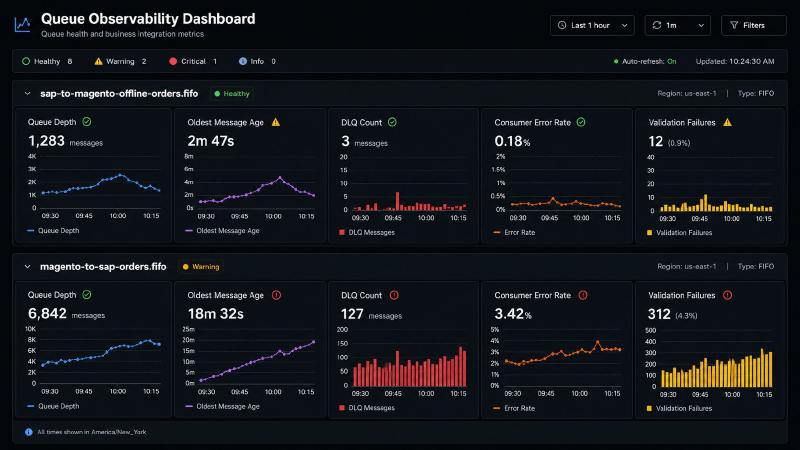
Queues make system behavior visible if you actually watch the right metrics.
At minimum, I would monitor these for each queue:
- Approximate number of visible messages.
- Approximate number of in-flight messages.
- Approximate age of oldest message.
- DLQ visible message count.
- Consumer error rate.
- Consumer processing duration.
- Number of validation failures.
- Number of successful imports/exports.
- Number of idempotency skips.
- Downstream API latency and failure rate.
The most important metric is often the age of the oldest message.
Queue depth tells me how much work is waiting.
Oldest message age tells me whether the system is falling behind.
A queue with 2,000 messages that drains quickly may be fine after a batch import.
A queue with one message that is six hours old may be a serious business issue.
For business integrations, I also want application-level metrics:
| |
Infrastructure metrics tell me whether the queue is healthy.
Business metrics tell me whether the integration is doing its job.
Both matter.
Where AfterShip Fits#
AfterShip should not be treated as an afterthought just because it sits behind the scenes.
Tracking and delivery visibility are part of the customer experience.
If a customer places a phone order or EDI order, Magento still needs to present that order in a way that feels consistent with a normal web order. If tracking exists, AfterShip can help provide shipment visibility and delivery estimates.
But that does not mean every system needs to directly call every other system in real time.
A better model is to let each integration boundary do one job well.
SAP-to-Magento offline order queue:
| |
Magento-to-SAP order export queue:
| |
AfterShip integration:
| |
Those flows may be related, but they should not all be one giant synchronous chain.
Because if one link in that chain fails, everything fails.
Queues let each piece recover independently.
Handling Invalid SAP Data#
The missing country problem is a perfect example of why validation matters.
A naive integration says:
| |
A better integration says:
| |
If the answer is no, then the system should create a clear failure record.
For example:
| |
That gives the team something actionable.
Instead of “Magento keeps retrying thousands of rows,” the conversation becomes:
| |
That is a much healthier operational model.
Replay Tooling Matters#
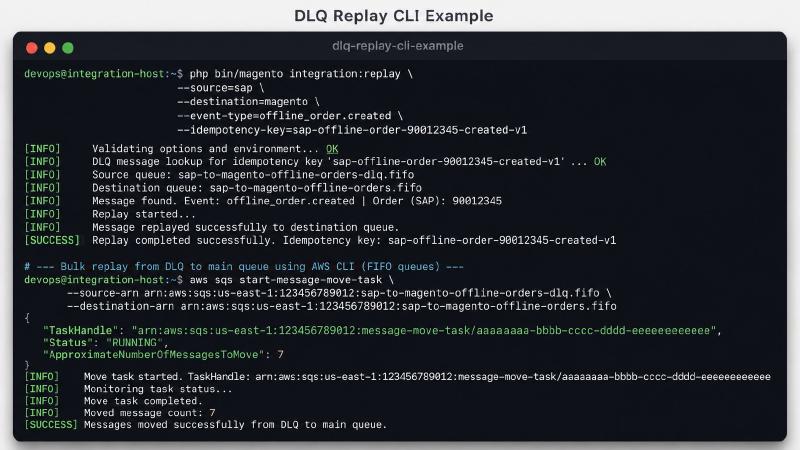
Eventually, someone will fix the bad data.
When that happens, the team needs a safe way to replay messages.
That replay process should be intentional. I do not want someone manually copying JSON out of AWS and pasting it into a random script on their laptop.
A simple CLI command is enough to start:
| |
Or for a DLQ redrive:
| |
The exact replay mechanism depends on how the system stores failures, but the rules should be clear:
- Do not replay until the root cause is fixed.
- Do not replay invalid messages blindly.
- Preserve correlation IDs.
- Preserve or intentionally regenerate idempotency keys.
- Preserve correct FIFO message group IDs.
- Preserve correct FIFO deduplication behavior.
- Log who replayed what and when.
- Replay in small batches first.
- Watch downstream metrics during replay.
Replay is not just a technical feature.
Replay is part of the operational contract.
Why Separate Queues Matter#
It can be tempting to create one general-purpose queue called something like:
| |
I would avoid that.
Separate queues make ownership and failure behavior much clearer.
SAP-to-Magento offline orders and Magento-to-SAP order exports are different workflows.
They have different producers.
They have different consumers.
They have different payloads.
They have different retry behavior.
They have different business impact.
They should not share the same queue just because they both involve orders.
A SAP offline order import failing means customers may not see an offline order in their account.
A Magento order export failing means SAP may not receive an e-commerce order or inventory-impacting update correctly.
Those are not the same problem.
Separate queues make that obvious.
When I Would Still Use Standard Queues#
This does not mean FIFO queues should be used everywhere.
Standard queues still make sense when each message is independent and ordering does not matter.
Examples:
| |
Standard queues are simple, scalable, and perfectly valid for many workloads.
But that is not the core case in this post.
This post is about SAP, Magento, offline orders, order export, customer-visible state, inventory-impacting activity, tracking updates, and business systems that can disagree about whether data is valid.
For that kind of workflow, I want per-order sequencing and queue-level deduplication.
That pushes me toward FIFO.
Common Gotchas#
1. Using One Global Message Group#
FIFO queues preserve order within a message group.
If every message uses the same group, everything becomes serialized.
Bad:
| |
Better:
| |
That lets one order process in sequence without blocking every other order.
2. Assuming FIFO Means Idempotency Is Solved#
FIFO helps, but downstream side effects can still happen before a message is deleted.
Consumers still need business-level idempotency.
3. Retrying Bad Data Forever#
If the payload is missing required fields, more retries will not fix it.
The worker needs to classify invalid payloads separately from retryable failures.
4. Choosing the Wrong Deduplication ID#
If the deduplication ID is too broad, different business events may collapse into one message.
If it is too narrow, obvious duplicates may not deduplicate.
The deduplication ID should represent the specific business event.
5. Making the Visibility Timeout Too Short#
If the visibility timeout is shorter than the processing time, another worker may receive the same message while the first worker is still processing it.
Set the timeout based on realistic processing duration.
If some jobs take longer, extend visibility during processing or split the work into smaller messages.
6. Making the Message Too Large#
SQS has message size limits.
Do not shove giant order documents into the queue if they do not need to be there.
For larger payloads, store the full document in S3 and send a pointer in the message.
7. Treating the DLQ as the End of the Story#
A DLQ without alerts is just a quieter failure.
A DLQ needs alarms, dashboards, ownership, and replay tooling.
8. Ignoring Schema Versioning#
Message contracts change.
Add schemaVersion from the beginning.
Consumers should reject unsupported versions clearly instead of failing mysteriously.
9. Mixing Business Failures With Infrastructure Failures#
A missing country code is not the same as a SAP timeout.
One needs data correction.
The other needs retry.
Do not send both through the same mental model.
A Practical Migration Path#
I would not cut this over recklessly, especially around a major WMS move or any other high-risk operational window.
The safest path is incremental.
Phase 1: Define the Message Contracts#
Before touching infrastructure, define the contracts.
For SAP-to-Magento:
| |
For Magento-to-SAP:
| |
This includes required fields, optional fields, schema versions, idempotency keys, message group IDs, deduplication IDs, and validation rules.
Phase 2: Add SQS FIFO Infrastructure#
Create the two FIFO queues and their FIFO DLQs.
Do not cut production traffic yet.
Just establish the infrastructure, IAM permissions, alarms, and dashboards.
Phase 3: Shadow Publish#
Start publishing messages to SQS while the existing path still runs.
Do not consume them for business impact yet.
Use this phase to inspect real payloads and validate assumptions.
This is where the ugly data shows up.
That is good.
I would rather find the missing country problem in shadow mode than during a hard cutover.
Phase 4: Build Consumers#
Build the Magento import consumer and SAP export worker.
Make them idempotent from day one.
Add structured logs, metrics, and failure classification.
Phase 5: Controlled Cutover#
Move one flow first.
I would probably start with the less risky direction or a limited subset of orders.
Watch queue age, DLQ count, validation failures, processing time, deduplication behavior, and business-level reconciliation.
Phase 6: Replay and Cleanup#
Once the queue-based flow is stable, clean up the old database-backed retry path.
This is important.
Leaving the old path around forever creates confusion.
Eventually, there should be one clear source of truth for each integration workflow.
The Bigger Lesson#
The real lesson is not “use SQS.”
The real lesson is that integration architecture should respect failure boundaries.
SAP, Magento, WMS, and AfterShip do not fail the same way.
They do not validate data the same way.
They do not recover the same way.
They do not have the same operational ownership.
They should not be glued together as if they are one perfectly reliable system.
A queue gives each side room to breathe.
SAP can produce an offline order event.
Magento can consume it when ready.
Invalid data can be rejected clearly.
Temporary failures can retry.
Poison messages can land in a DLQ.
Operators can inspect, fix, and replay.
FIFO queues add another important layer: order-aware processing.
For SAP-to-Magento and Magento-to-SAP, that matters. These are not disposable events. They are order lifecycle events. They deserve per-order sequencing, deduplication, and business-safe idempotency.
That is the difference between a fragile integration and an operationally sane one.
For e-commerce systems, that difference matters.
Because when order data is wrong, customers feel it.
When tracking data is late, customers feel it.
When inventory updates are delayed, customers feel it.
When retries pile up silently for weeks, the business eventually feels it.
Queues do not eliminate integration problems.
They make those problems visible, recoverable, ordered, and contained.
That is exactly why they belong between systems that do not fail the same way.