Secrets Management for Dotfiles: Bitwarden, Chezmoi Templates, and Safe Automation#
A reproducible desktop setup is only useful if it can rebuild the parts that actually matter.
It is easy to version control shell aliases, Hyprland configs, Waybar themes, Git settings, package lists, and service files. That is the comfortable part of dotfiles. The uncomfortable part is everything those configs eventually touch:
- SSH private keys
- API tokens
- Wi-Fi credentials
- Git signing material
- Cloud provider credentials
- Personal service tokens
- Local
.envvalues - Application-specific secrets that quietly accumulate over time
That is where dotfiles can get dangerous.
My rule is simple:
Secrets never go in the dotfiles repo. Ever.
Not plaintext. Not “temporarily.” Not because the repo is private. Not because I plan to clean it up later. Not even encrypted unless I have a very specific reason and a very specific threat model.
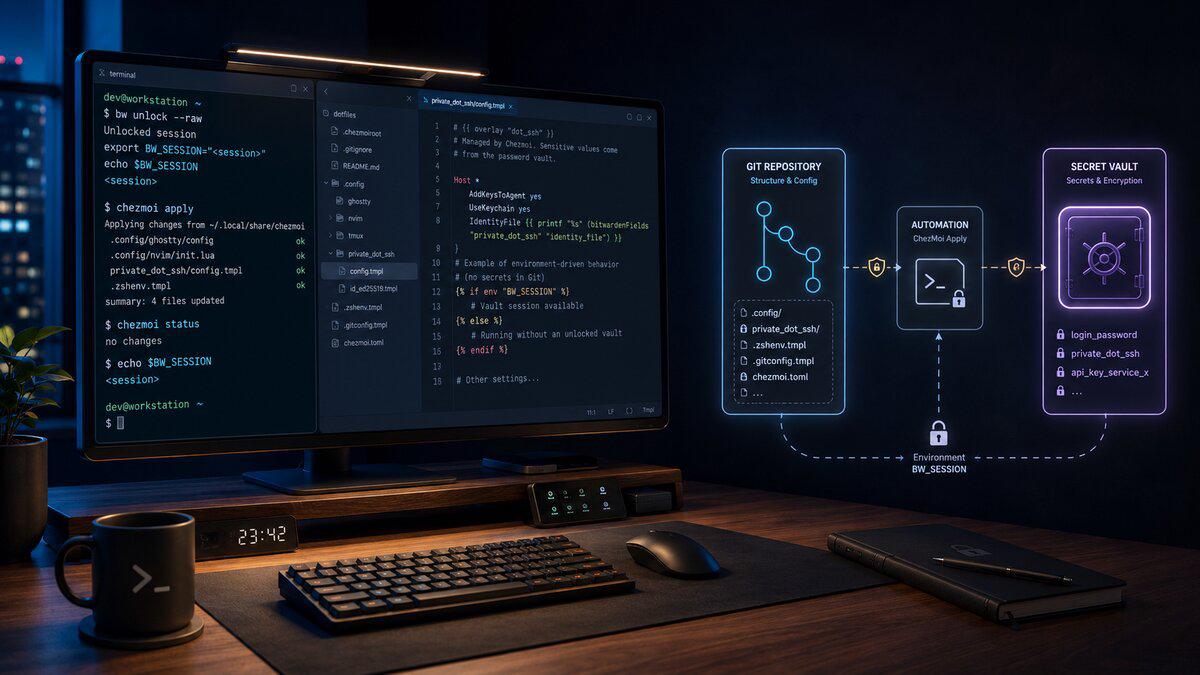
For my workstation setup, Bitwarden is the source of truth for secrets. Chezmoi is responsible for rendering templates. Git is responsible for versioning the structure around those templates.
That separation matters.
Git stores the shape of the machine.
Bitwarden stores the sensitive values.
Chezmoi joins them together at apply time.
The Problem With “Just Put It in Dotfiles”#
Dotfiles start innocently.
First it is a .zshrc.
Then it is Git config.
Then it is SSH config.
Then it is application settings.
Then it is a helper script.
Then one day there is an API token inside a shell export because it was faster to paste it there than wire up proper secret management.
That is usually how secrets leak. Not because someone sat down and made a reckless architectural decision, but because convenience slowly beat discipline.
The risks are obvious:
- A private repo can become public.
- A committed secret lives forever in Git history unless aggressively purged.
- A backup, fork, clone, or CI job can preserve data you thought you removed.
- A debug log can print values during bootstrap.
- A local machine can become harder to audit because secrets are scattered everywhere.
For a reproducible workstation, I want the opposite.
I want my dotfiles repo to be boring. If someone sees it, the worst thing they should get is my preferred editor settings, Hyprland structure, shell aliases, and maybe some strong opinions about Linux.
They should not get credentials.
The Architecture: Git for Configuration, Bitwarden for Secrets#
The architecture I want looks like this:
| |
The important part is that the secret does not move through Git.
The repo only contains references like:
| |
or:
| |
Those references are useless without an unlocked Bitwarden session on the local machine.
That gives me the automation I want without turning my dotfiles into a credential dump.
Why Bitwarden Fits This Workflow#
I use Bitwarden here because it gives me a practical balance between security and usability.
For a workstation bootstrap, I do not want a complicated enterprise secrets platform just to restore my SSH key and a handful of local credentials. I also do not want secrets copied into random shell files.
Bitwarden gives me:
- A real encrypted vault
- A CLI interface through
bw - Cross-machine access
- Attachments for things like SSH private keys
- Custom fields for API tokens and structured values
- A workflow that pauses for human unlock when needed
Chezmoi can call Bitwarden from templates, so I can keep my dotfiles declarative while still pulling sensitive values from the vault during chezmoi apply.
That means a fresh machine can be rebuilt with a flow like this:
| |
At some point, the process should pause and require me to unlock Bitwarden.
That pause is a feature, not a bug.
I do not want a fully unattended system silently pulling every secret I own onto a new machine. I want safe automation: automate the boring parts, but require explicit authentication before sensitive material is rendered locally.
Installing the Required Tools#
On Arch, the packages I care about are:
| |
Depending on the machine and package availability, bitwarden-cli may come from the AUR. The jq package is not strictly required for chezmoi templates, but it is useful when inspecting Bitwarden CLI output manually.
I also want to confirm the CLI works before wiring it into automation:
| |
Then I log in:
| |
Or, if already logged in, unlock the vault:
| |
The important part is BW_SESSION.
That environment variable represents the active unlocked Bitwarden CLI session. If it is not set, bw may require an unlock before it can retrieve secrets.
For my workflow, I want this to be temporary. I do not want to permanently export BW_SESSION in .zshrc, commit it somewhere, or write it into a log.
A session token is sensitive. Treat it like a secret.
Configuring Chezmoi to Use Bitwarden#
Chezmoi can be configured to automatically unlock Bitwarden when needed.
In my chezmoi config:
| |
With this enabled, chezmoi can call bw unlock when BW_SESSION is missing.
That gives me the behavior I want during a fresh machine bootstrap:
- Start
chezmoi apply. - Chezmoi reaches a template that needs Bitwarden.
- Bitwarden requires unlock.
- I authenticate.
- Chezmoi renders the file locally.
- Secrets are written only to the destination machine.
This keeps the process automated without pretending secrets should be unattended.
Vault Organization#
The biggest mistake I see with password-manager-backed dotfiles is poor naming.
If the vault is messy, the templates become messy.
I prefer names that describe infrastructure purpose, not just application names.
For example:
| |
Inside Bitwarden, I would use a folder or collection like:
| |
Then each item should have predictable fields.
For API tokens, I like custom fields:
| |
For Wi-Fi:
| |
For SSH keys, I prefer attachments:
| |
You could store the SSH private key as a secure note field, but I prefer attachments because it maps cleanly to files.
The goal is consistency. Templates should be boring because the vault structure is predictable.
Rendering an SSH Key With Chezmoi#
For SSH, I want the private key restored locally with strict permissions.
In the chezmoi source directory, the target file might look like this:
| |
The private_ prefix tells chezmoi to apply restrictive permissions.
Inside the template:
| |
For the public key:
| |
| |
After applying:
| |
I still like to verify permissions:
| |
Expected result:
| |
If needed:
| |
I would usually enforce that with a script rather than trust myself to remember.
Example chezmoi script:
| |
The key detail: the private key itself never exists in the repository. Only the template reference does.
Rendering API Tokens#
API tokens are a better fit for Bitwarden custom fields.
Example Bitwarden item:
| |
A chezmoi-managed shell environment file might look like this:
| |
Template:
| |
That renders to:
| |
Only on the local machine.
The source repo only contains:
| |
That is the pattern I want everywhere.
Avoiding Secrets in Shell Startup Files#
One thing I am still cautious about: exporting secrets globally from .zshrc.
It is convenient, but it also means every shell inherits those values. That can leak into child processes, logs, debugging tools, shell history accidents, and application environments.
For some tokens, that may be acceptable.
For others, I prefer a function that loads the secret only when needed.
Example:
| |
That keeps the default shell cleaner.
The tradeoff is convenience. For commands I run constantly, I may allow a generated private exports file. For rarely used or higher-risk secrets, I would rather load on demand.
That is the kind of decision worth making per secret, not globally.
Wi-Fi Credentials#
Wi-Fi credentials are another interesting case.
On Linux, NetworkManager can store Wi-Fi profiles under:
| |
Those files require root ownership and strict permissions, so I do not want to casually render them as a normal user without thinking through the process.
A possible template could look like this:
| |
But I would not blindly drop that into place as part of my normal user-level dotfiles apply.
Instead, I would separate this into a machine bootstrap step:
| |
For Wi-Fi, the important question is not “can chezmoi template it?”
It can.
The better question is “should this be part of my normal dotfiles apply, or part of a privileged machine bootstrap?”
For me, Wi-Fi belongs in the bootstrap category because it touches system-level networking.
Safe Automation Rules#
This is the part I care about most.
The goal is not just automation.
The goal is safe automation.
My rules:
- Never commit secrets to the repo.
- Never print secrets during bootstrap.
- Never run with
set -xaround secret commands. - Never store
BW_SESSIONpermanently. - Use restrictive file permissions for rendered secrets.
- Keep privileged system secrets separate from normal user dotfiles.
- Make secret rendering explicit enough that I can audit it later.
That means my scripts should look like this:
| |
Notice what this does not do.
It does not echo secret values.
It does not store the session token.
It does not run debug tracing.
It does not redirect sensitive command output into logs.
It keeps the workflow human-approved while still automated.
Preventing Accidental Secret Commits#
Even with this setup, I still want guardrails.
The first one is a .gitignore inside the chezmoi source repo.
Example:
| |
That is not enough by itself, but it prevents obvious mistakes.
I also like the idea of using a pre-commit secret scanner.
For example:
| |
Then:
| |
For a repo that is supposed to never contain secrets, a scanner should be boring. If it finds something, I want to know before that commit leaves my machine.
I would eventually wire that into a pre-commit hook:
| |
Again, the goal is not to rely on one perfect tool.
The goal is layers:
- Discipline
- Repository structure
.gitignore- Chezmoi templates
- Bitwarden source of truth
- Secret scanning
- Careful bootstrap scripts
What Else Should Live in Bitwarden?#
SSH keys and API tokens are obvious.
Wi-Fi credentials are also reasonable.
But once I started thinking about my dotfiles this way, I realized there are probably more values that belong in Bitwarden than I originally considered.
Candidates include:
- GitHub personal access tokens
- Cloudflare API tokens
- AWS access keys for personal lab accounts
- Tailscale auth keys
- SMTP credentials for local tools
- Grafana or Datadog API keys
- Package registry tokens
- Docker registry credentials
- Private GPG keys or signing material
- Recovery codes for developer services
- License keys for paid software
- Local-only
.envvalues for side projects
The test is simple:
Would I be uncomfortable if this value appeared in a public GitHub repo?
If yes, it belongs in Bitwarden, not dotfiles.
What I Would Not Automate Blindly#
There are some things I do not want a dotfiles apply to handle without a deliberate step.
For example:
- Replacing system NetworkManager profiles
- Installing private SSH keys onto a machine I have not verified
- Pulling every cloud credential automatically
- Writing production credentials onto a personal workstation
- Rendering secrets into globally sourced shell files without thinking about scope
Automation should reduce mistakes, not remove judgment.
My ideal bootstrap asks me to unlock Bitwarden, renders only what the machine needs, sets permissions correctly, and then gets out of the way.
A Practical Bootstrap Flow#
The full new-machine flow should eventually look something like this:
| |
This is the direction I want my workstation automation to go.
One command should be able to rebuild the machine, but not at the expense of exposing secrets.
Troubleshooting and Gotchas#
Chezmoi Cannot Find bw#
If chezmoi fails because it cannot find the Bitwarden CLI, confirm it is installed and on the path:
| |
If bw exists in an unusual location, fix the path before running chezmoi apply.
Bitwarden Is Logged In but Locked#
Being logged in is not the same as being unlocked.
Check status:
| |
If locked:
| |
Then re-run:
| |
The Template Works Manually but Fails in Chezmoi#
This is usually an environment issue.
The current shell may have BW_SESSION, but the process running chezmoi may not.
Check:
| |
If needed, run:
| |
Secrets Show Up in Diffs#
Be careful with:
| |
If templates render secrets, diffs may display generated values depending on what changed.
For sensitive files, I avoid casually pasting diffs into tickets, chats, logs, or blog posts. I also avoid running verbose debug output around secret rendering.
SSH Rejects the Key#
SSH is strict about permissions.
Fix them:
| |
Then test:
| |
Secret Names Changed in Bitwarden#
Templates depend on stable item names or IDs.
If I rename Bitwarden items freely, templates can break.
For long-term stability, item IDs are more reliable. For readability, names are nicer. I generally prefer readable names while the system is still evolving, then switch critical templates to IDs once the vault structure settles.
The Security Boundary I Want#
This setup is not trying to make my local machine magically immune to compromise.
If my workstation is compromised while Bitwarden is unlocked, there is risk. That is true of any local secret workflow.
The boundary I care about here is narrower and practical:
- Git should never contain secrets.
- A cloned dotfiles repo should be safe to inspect.
- A new machine should require explicit Bitwarden authentication.
- Secrets should only render locally.
- Generated secret files should have correct permissions.
- Automation should not print sensitive values.
- Sessions should not be stored permanently.
That is a realistic boundary for workstation automation.
It is not security theater. It is reducing the most likely mistakes.
Final Thoughts#
Dotfiles are infrastructure.
Maybe not production infrastructure. Maybe not customer-facing infrastructure. But they are still the automation layer for the machine I use every day to write code, manage systems, access cloud environments, and do real work.
That means they deserve the same discipline I would apply anywhere else:
- Separate config from secrets.
- Keep sensitive values out of Git.
- Make automation repeatable.
- Make failure modes obvious.
- Avoid cleverness where boring security works better.
For my setup, Bitwarden and chezmoi hit the right balance.
Chezmoi gives me reproducible configuration.
Bitwarden gives me a safe place for secrets.
The repo describes what the machine should look like.
The vault provides the values that should never be in the repo.
That is exactly the split I want.