Building a Golden AMI for Magento 2 on ARM64 with Packer#
Magento 2 is not a lightweight application.
That matters when you are trying to deploy it like modern infrastructure.
A Magento backend deploy is not always just a code pull and a service restart. Depending on the change, a deploy can involve Composer dependencies, generated dependency injection code, static assets, module schema changes, cache behavior, session handling, PHP extension compatibility, Nginx configuration, PHP-FPM tuning, and database upgrade steps.
That is a lot of surface area.
In an e-commerce environment, that surface area matters because the backend is not some internal side project. It supports APIs, admin workflows, order operations, integrations, and the systems that keep the business moving.
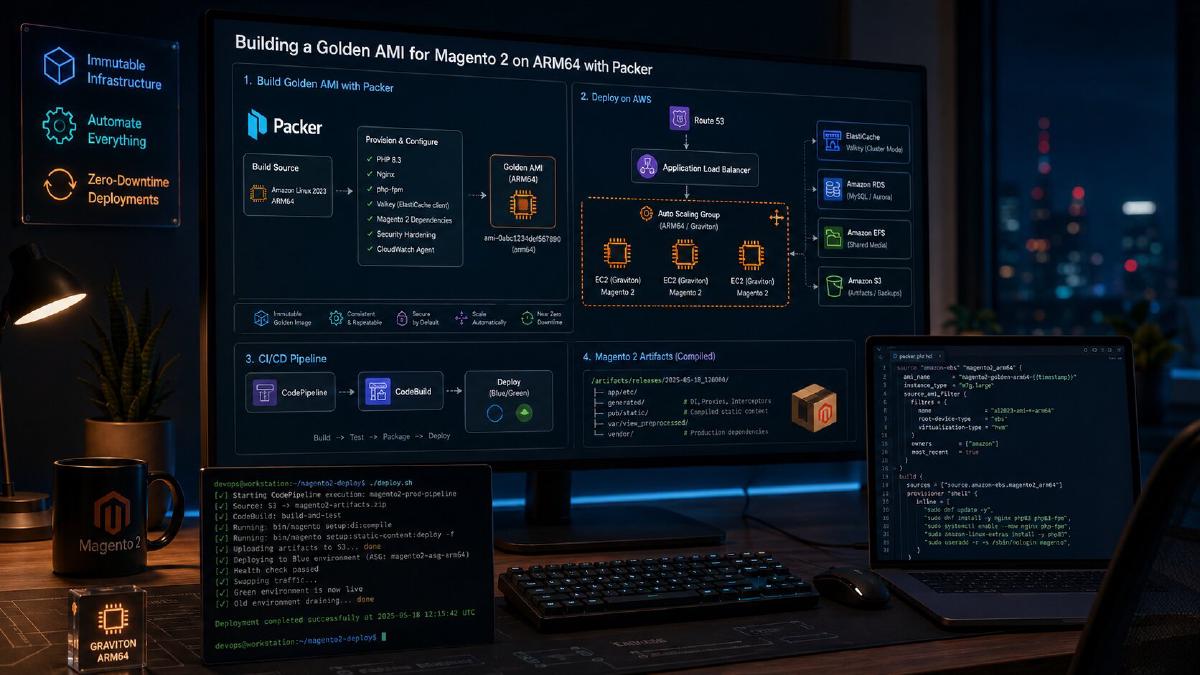
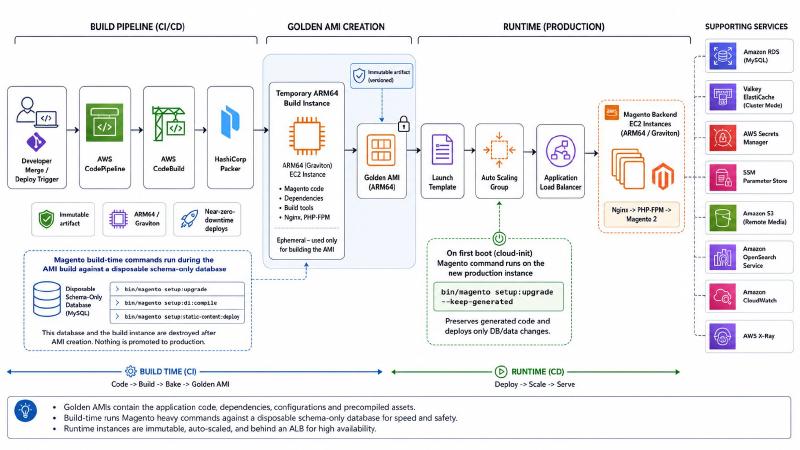
For our Magento 2 backend, I moved toward a Golden AMI deployment model using Packer, ARM64 EC2 instances, CodePipeline, CodeBuild, an Auto Scaling Group, and an Application Load Balancer.
The result is a much cleaner deployment pattern:
- A deploy triggers CodePipeline.
- CodeBuild runs Packer.
- Packer creates a fresh ARM64 Magento backend AMI.
- Magento compile-heavy commands run during the AMI build, not while a production instance is serving traffic.
- The new AMI is promoted through the Auto Scaling Group.
- New instances bootstrap runtime configuration from AWS Secrets Manager and SSM Parameter Store.
- Production database upgrades run with generated files preserved.
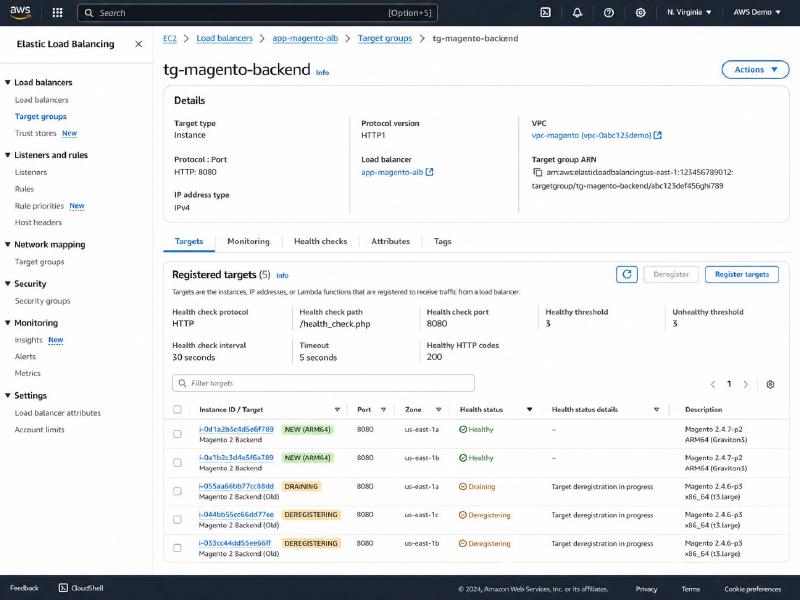
- The ALB only routes traffic to healthy new instances.
- Old instances drain out.
That gives us near-zero-downtime backend deploys without treating Magento servers like snowflakes.
The Problem: Magento Deploys Are Expensive at Runtime#
The goal was not simply “build an AMI.”
The real goal was to stop doing expensive, risky deployment work while production backend instances were actively serving traffic.
Magento has several commands that are painful to run directly on live backend servers during a deploy window:
| |
Those commands are not equal.
setup:upgrade is database-aware. It applies module updates, schema patches, data patches, and version changes.
setup:di:compile generates dependency injection code and metadata. It is CPU and memory heavy.
setup:static-content:deploy builds frontend/admin static assets. It can take real time depending on themes, locales, modules, and deployment mode.
The key architectural question is this:
Which of these steps actually need to happen on a production server while that server is coming online?
For me, the answer was obvious.
The compile and static asset work should not happen on every production instance at boot. That work should happen once in a controlled build environment, and then the result should be baked into an immutable artifact.
That artifact is the Golden AMI.
Why I Used a Golden AMI Instead of Dockerizing Magento#
The first question people usually ask is:
Why not Docker?
Magento can be containerized. I do not want to pretend otherwise.
A containerized Magento setup can absolutely work, especially when the rest of the platform is already built around ECS, Kubernetes, or a clean container deployment model. A common approach would be:
- One container for Nginx.
- One container for PHP-FPM.
- Shared code baked into the image or mounted into both containers.
- External Valkey or Redis.
- External RDS.
- Remote media storage.
- Separate cron or worker containers.
- CI/CD building and publishing versioned images.
That is a valid architecture.
But Docker does not magically remove Magento complexity.
You still need to answer the hard questions:
- Where are generated DI files created?
- Where does static content deployment happen?
- How are PHP extensions built?
- How do Nginx and PHP-FPM share the same Magento codebase?
- How are secrets rendered?
- How does
setup:upgraderun safely? - Which process owns cron?
- How does media storage work?
- How do sessions survive scaling?
- How do you validate the image before traffic reaches it?
For this backend, a Golden AMI was the cleaner operational fit.
Magento already expects a fairly rich runtime environment. Our backend needs Nginx, PHP-FPM, PHP 8.3, Magento-required extensions, custom extensions for our code, generated Magento artifacts, CloudWatch, X-Ray, runtime secrets, Valkey-backed state, and role-specific behavior for API/admin instances.
Could I have Dockerized it?
Yes.
Do I think Docker would have made this specific deployment path simpler?
No.
Not at this stage.
The AMI model gave me:
- An immutable server artifact.
- A known-good PHP/Nginx/Magento runtime.
- ARM64 compatibility validated during the build.
- Faster Auto Scaling Group replacement.
- No Composer install on first boot.
- No normal DI compile on first boot.
- A simpler operational model for EC2, ALB, and Auto Scaling.
- A clean separation between build-time artifacts and runtime secrets.
That last part is the most important.
The Golden AMI contains the application and generated artifacts.
It does not contain production secrets.
Runtime configuration is rendered when the instance boots.
The Runtime Architecture#
At runtime, the backend is intentionally straightforward.
| |
Nginx lives directly on the instance in front of PHP-FPM.
The ALB points to the Auto Scaling Group.
Magento uses Valkey ElastiCache for shared state so instances can be replaced without tying sessions or cache to a specific EC2 host.
The production database lives in RDS.
Media is remote.
Secrets and environment-specific values are not baked into the image. They are pulled at boot from AWS Secrets Manager and SSM Parameter Store.
That gives the deployment model a clean split:
| |
What the Golden AMI Contains#
The Golden AMI is not just a base Linux image with a deploy script.
It contains a complete Magento runtime.
At a high level, the Packer build installs and prepares:
- Amazon Linux 2023 ARM64.
- Nginx.
- PHP 8.3.
- PHP-FPM.
- Magento-required PHP extensions.
- Custom PHP extensions needed by our code.
- Composer.
- Magento source code.
- Composer dependencies.
- Generated dependency injection files.
- Static content.
- PHP-FPM configuration.
- Magento-specific PHP tuning.
- CloudWatch agent.
- AWS X-Ray daemon.
- X-Ray PHP instrumentation.
- Runtime bootstrap scripts.
- Nginx templates for API/admin roles.
- Runtime
env.phprendering scripts. - X-Ray sampling sync tooling.
That is the point of the AMI.
When a new production instance launches, I do not want it building itself from scratch. I want it to already be a Magento backend server, with only runtime-specific configuration left to apply.
The Build Pipeline#
The deployment pipeline looks like this:
| |
The temporary build instance is disposable.
That matters.
If PHP extensions fail to compile, Composer authentication breaks, Magento DI compilation fails, or static content deployment fails, production has not changed yet.
The build fails before the new AMI exists.
That is exactly where failure should happen.
Building ARM64 from the Start#
The Packer build starts from an Amazon Linux 2023 ARM64 image and builds on an ARM64 EC2 instance type.
That is not just a cost or performance decision.
It is a validation decision.
If production is going to run on ARM64, the build should run on ARM64 too.
I do not want to discover architecture-specific issues after the Auto Scaling Group starts replacing production instances. I want to catch those during the AMI build.
A simplified version of the Packer source looks like this:
| |
The important part is that the build and runtime architecture match.
ARM64 problems should fail the build.
They should not become production incidents.
Building Against a Disposable Magento Database#
One of the most important decisions in this architecture is that the AMI build does not compile against the production database.
During the AMI build, Magento needs enough environment to bootstrap. It needs module configuration, database access, cache/session settings, and a valid env.php so the CLI can run.
But it does not need production data.
So the build uses an empty, fresh Magento RDS database that only contains schema. This can run on a small/free-tier style database because the point is not performance testing. The point is safe compilation and validation.
During the Packer build, the pipeline can run:
| |
That lets Magento validate the code, modules, generated classes, and static asset generation without affecting the production database.
This is a major operational improvement.
The build database is there to answer one question:
Can this version of the Magento codebase build cleanly from a fresh schema state?
If the answer is no, the deploy should stop before anything gets promoted.
Build-Time env.php vs Runtime env.php#
Magento’s app/etc/env.php is one of the most important files in the entire deployment.
It contains environment-specific configuration:
- Database credentials.
- Cache configuration.
- Session storage configuration.
- Crypt key.
- Search configuration.
- Remote storage settings.
- Lock provider settings.
- Other integration-specific values.
That file should not be blindly baked into an AMI with production secrets.
So I split the problem into two different phases.
Build-Time env.php#
During the Packer build, I render a temporary build-time env.php.
That file exists only long enough for Magento to run the build commands.
It points to the disposable build database and uses build-safe values. In a simplified version, the build-time file can use file-based cache/session settings because the build does not need production Valkey.
Conceptually:
| |
After Magento compiles, the build removes that file:
| |
That leaves the AMI with generated code and static assets, but without the build-time environment configuration.
Runtime env.php#
At boot, the instance renders the real env.php.
That file is generated from AWS Secrets Manager and SSM Parameter Store.
A simplified runtime bootstrap flow looks like this:
| |
Then the bootstrap renders env.php:
| |
The rule is simple:
| |
That separation keeps the AMI reusable, safer, and easier to promote.
Valkey ElastiCache for Shared State#
Running Magento behind an Auto Scaling Group means local instance state needs to be minimized.
If sessions live on the local filesystem, scaling becomes fragile. A customer or admin user could land on a different backend instance and lose state.
If cache is local only, every new instance has to rebuild too much state.
So Valkey ElastiCache handles the shared Magento runtime state.
In this architecture, Valkey is used for:
- Sessions.
- Default cache.
- Page cache.
- Custom cache buckets.
- Magento locking.
A simplified runtime env.php cache/session structure looks like this:
| |
The exact database numbers are less important than the principle:
Shared runtime state belongs outside the EC2 instance.
That is what allows new backend instances to join and old instances to drain without pinning users or cache behavior to one server.
Nginx in Front of PHP-FPM#
The backend instance runs Nginx in front of PHP-FPM.
This is one of the reasons I did not rush to containerize the backend. Magento’s runtime expects the web server and PHP runtime to work closely together around the same codebase, generated files, static files, media paths, and application root.
That can be done with containers, but it is not automatically simpler.
On the AMI, the build configures PHP-FPM to run as the Nginx user and listen on a Unix socket:
| |
Magento also gets PHP tuning that is appropriate for heavier backend work:
| |
The specific numbers should be tuned for each environment, but the important part is that these settings are part of the AMI build.
They are not manual edits on individual servers.
A Simple ALB Health Check Endpoint#
The ALB health check endpoint is intentionally simple.
The bootstrap writes a small file into Magento’s pub directory:
| |
That is it.
I do not want the ALB health check bootstrapping the full Magento application, connecting to the database, checking OpenSearch, touching Valkey, or doing anything expensive every few seconds.
The ALB needs to know whether the instance can serve HTTP traffic through Nginx.
Deeper health checks belong somewhere else:
- Synthetic monitoring.
- Post-deploy validation.
- CloudWatch alarms.
- X-Ray traces.
- Application-level dashboards.
- Targeted endpoint checks.
Health checks should be useful.
They should not become load generators.
API and Admin Roles#
Not every Magento backend instance should do the same job.
In this deployment model, the bootstrap supports role-specific behavior.
For example, an API instance and an admin instance can render different Nginx templates:
| |
Cron is also role-specific.
Magento cron should not run on every backend instance in an Auto Scaling Group.
If every instance runs cron, you can create duplicate work, lock contention, and operational confusion.
So the bootstrap only installs cron for the admin role:
| |
That separation is small, but important.
When infrastructure scales horizontally, background work needs ownership.
Production Database Upgrade with –keep-generated#
The AMI contains compiled Magento artifacts.
When a new production instance launches from that AMI, it still needs to make sure the production database is at the correct module/schema version.
That is where this command comes in:
| |
The --keep-generated flag matters.
I already compiled generated files during the AMI build. I do not want a production instance throwing away those generated files and rebuilding them at boot.
The new instance should apply any required database/module updates while preserving the generated artifacts baked into the AMI.
This works because the AMI is locked to a specific code and module version.
Every instance launched from that AMI has:
- The same Magento code.
- The same module versions.
- The same Composer dependencies.
- The same generated files.
- The same static assets.
- The same PHP extension set.
- The same Nginx/PHP-FPM baseline.
That makes the upgrade path idempotent in the deployment flow because the instances are not drifting independently.
Still, database mutation deserves respect.
Long-term, I like the idea of making the database upgrade step even more explicit with a lifecycle hook, deployment lock, or one-shot migration job. But the core safety improvement is already there:
Production instances are no longer compiling themselves from scratch during deployment.
They are launching from a known artifact.
The Auto Scaling Group Rollout#
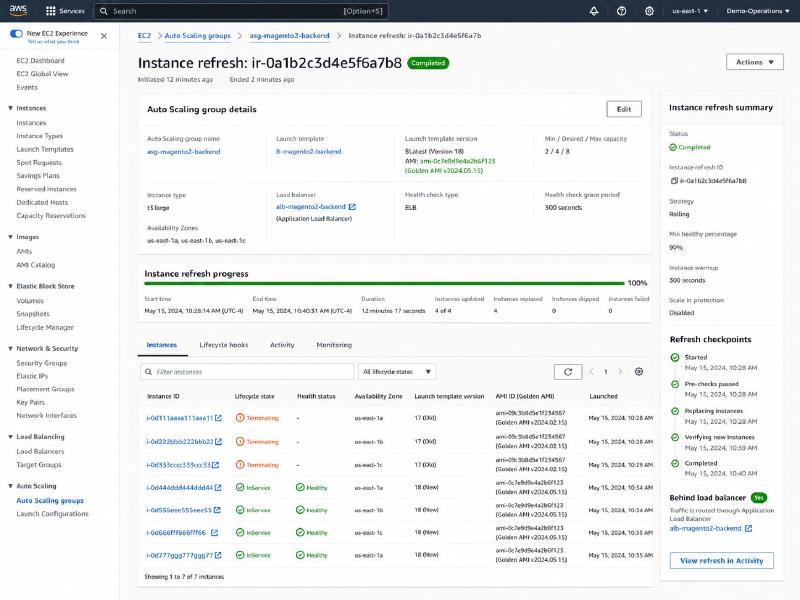
Once the AMI is built, the Auto Scaling Group handles replacement.
The deployment flow looks like this:
| |
This is where the near-zero-downtime behavior comes from.
The old backend instances continue serving traffic while the new backend instances initialize. The ALB does not send traffic to a new instance until it passes the health check. The old instance does not disappear instantly; it drains.
That changes the deployment model from this:
| |
To this:
| |
That is a much better operational model.
Observability: CloudWatch and X-Ray#
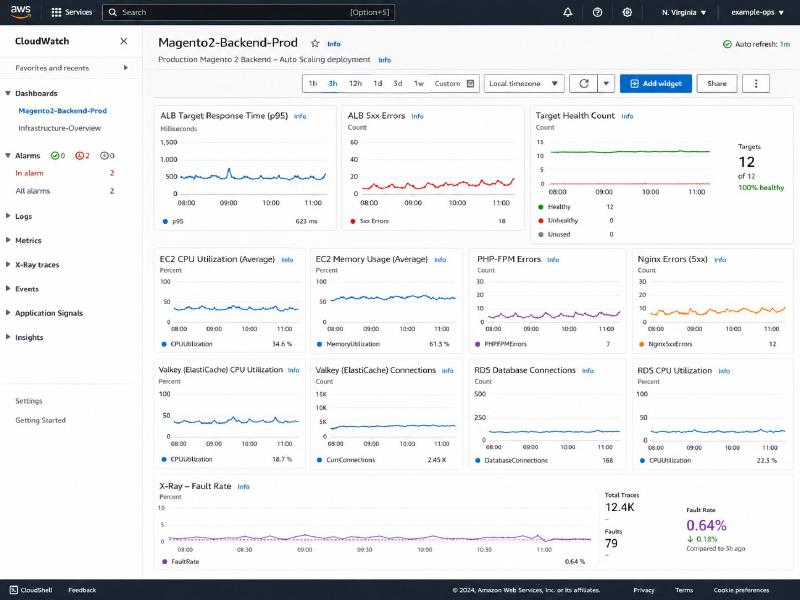
The AMI includes the CloudWatch agent and AWS X-Ray daemon.
The bootstrap renders the CloudWatch agent configuration at runtime so environment-specific labels can be injected cleanly:
| |
For tracing, I use X-Ray with a default sample rate of 10%.
The sample rate is pulled from SSM Parameter Store and written to local runtime state:
| |
I like this approach because it gives me control without rebuilding the AMI just to tune tracing volume.
At 10%, tracing is useful without turning every request into telemetry noise.
The X-Ray PHP instrumentation is loaded through PHP-FPM using an auto-prepend file. That keeps the instrumentation out of most application code.
It also allows me to skip things that should not be traced:
- CLI commands.
- Health checks.
- Static assets.
- Requests that are not useful for application tracing.
A simplified version:
| |
That gives me request-level visibility without drowning in low-value traces.
The ARM64 Gotcha: PHP Extensions#
The hardest part of moving this backend to ARM64 was not Nginx.
It was not Packer.
It was not the Auto Scaling Group.
It was PHP extensions.
PECL is terrible.
That is the most direct way I can say it.
PECL can be painful even on a normal x86_64 PHP environment. Add ARM64, Amazon Linux 2023, PHP 8.3, extension version pinning, and CI automation, and the rough edges show up quickly.
PIE, the PHP Installer for Extensions, has been a better path.
The build uses a mix of Amazon Linux packages and PIE-installed extensions. Redis can come from the Amazon Linux repositories, while extensions like Imagick, MongoDB, SSH2, gRPC, and Protobuf can be installed through PIE or custom source flows.
The build does not just install extensions and hope.
It verifies them:
| |
Then it checks the expected production extension set:
| |
This validation is worth the build time.
A missing PHP extension should fail the AMI build.
It should not become a production incident after the instance joins the load balancer.
Composer Auth and CI Reality#
Another detail that matters more than people expect: Composer authentication.
The build needs non-interactive access to:
- The Magento code repository.
- Magento Marketplace packages from
repo.magento.com. - GitHub API downloads used by some extension installers.
- Any custom or private packages.
In a local development environment, an interactive Composer auth prompt is annoying.
In CodeBuild, it is fatal.
So the AMI build configures Composer up front.
For GitHub-backed downloads, the build can configure Composer like this:
| |
For Magento Marketplace credentials:
| |
The build should also validate tokens early.
It is much better to fail at the beginning of a Packer build because a GitHub or Magento token is wrong than to fail after ten minutes of package installs and extension compilation.
This is not glamorous infrastructure work.
But it is the kind of work that makes deploys boring.
And boring deploys are the goal.
Verifying Magento Before Capturing the AMI#
Before the AMI is captured, the build verifies that Magento can actually bootstrap.
One useful check is making sure the Magento CLI registers the commands needed for compilation:
| |
Then the build runs the compile steps:
| |
After compilation, the build checks for generated metadata:
| |
That check is simple, but it protects the whole deployment model.
If generated code is missing, the instance may need to compile on first boot. That is exactly what this architecture is designed to avoid.
A production backend instance should not join an Auto Scaling Group and then spend several minutes compiling Magento before it can serve traffic.
The Most Important Rule: Do Not Bake Production env.php into the AMI#
The AMI should contain:
- Code.
- Dependencies.
- Generated files.
- Static assets.
- Runtime software.
- Bootstrap tooling.
- Monitoring agents.
- Service configuration templates.
The AMI should not contain:
- Production database passwords.
- Valkey auth tokens.
- Integration secrets.
- Environment-specific domains.
- Production-only
env.php. - Build database credentials.
That is why the build removes app/etc/env.php before the AMI is captured.
| |
Then first boot renders the real file from AWS-managed configuration.
This is the pattern I want:
| |
That separation is what makes the architecture maintainable.
Gotchas and Edge Cases#
PECL and ARM64 Will Waste Your Time#
This was the biggest practical frustration.
PIE has been much better than PECL, but there are still challenges finding extensions that work cleanly on ARM64, Amazon Linux 2023, and older or specific PHP versions.
The only way I am comfortable handling that is to make extension installation part of the AMI build and fail hard if anything is missing.
Do not let production instances discover missing extensions.
app/etc/config.php Needs to Be Committed#
Magento’s app/etc/config.php matters.
The build expects module configuration to exist in the repository. If that file is missing, Magento may not know which modules should be enabled during compilation.
The build should fail clearly:
| |
Magento is not just a directory of PHP files.
Module state is part of the deployment contract.
First Boot Compilation Should Be a Warning, Not the Normal Path#
I do keep a defensive check in bootstrap logic.
If generated files are missing, the instance can compile them on first boot.
But that is not the normal path.
It should log loudly because it means the AMI build did not produce the artifact I expected.
Conceptually:
| |
This fallback protects the instance, but it should not hide a broken build process.
A properly built AMI should already contain generated files.
Health Checks Should Stay Cheap#
It is tempting to make the ALB health check smarter.
I avoid that.
A health check that fully boots Magento, connects to RDS, checks Valkey, touches OpenSearch, and validates application behavior can turn into its own source of instability.
The ALB health check should answer one question:
Can this target accept HTTP traffic?
Application correctness should be validated separately.
Cron Must Be Owned by One Role#
Magento cron should not run everywhere.
In an Auto Scaling Group, duplicate cron runners can create confusing behavior and unnecessary contention.
Assign cron intentionally.
In my case, API instances do not get cron. Admin-role instances do.
The Build Database Should Be Disposable#
The schema-only build database should be treated like CI infrastructure.
It should not become a second production-like database that people manually maintain.
The ideal version of this flow is:
| |
That keeps the build environment clean and predictable.
Database Upgrades Still Deserve a Guardrail#
The AMI version makes setup:upgrade --keep-generated safe in this flow because all new instances have the same code and module versions.
But database upgrades are still database upgrades.
For a future refinement, I would like to make the production upgrade step more explicitly serialized with one of these patterns:
- An Auto Scaling lifecycle hook.
- A deployment lock in DynamoDB.
- A one-shot CodeBuild migration step before instance refresh.
- A dedicated admin/migration instance role.
- A controlled deployment script that upgrades once, then refreshes the ASG.
The current architecture is already a major improvement over rebuilding live servers.
This would make the database mutation step even cleaner.
Why This Enables Near-Zero-Downtime Deploys#
The important shift is this:
Production is no longer being rebuilt in place.
Production capacity is being replaced with prebuilt capacity.
The expensive work happens before the instance ever receives traffic:
- OS package installation.
- PHP extension installation.
- Composer install.
- Magento DI compilation.
- Static content deployment.
- CloudWatch agent installation.
- X-Ray daemon installation.
- PHP-FPM tuning.
- Nginx template installation.
- Bootstrap asset installation.
At runtime, the instance only needs to:
- Render secrets.
- Render environment configuration.
- Render Nginx config.
- Preserve generated files.
- Run
setup:upgrade --keep-generated. - Start services.
- Pass the ALB health check.
That is why the deploy can be close to zero downtime.
The old servers stay in service while the new servers come online. The ALB only routes to healthy targets. The Auto Scaling Group handles replacement. Old instances drain out.
This is the difference between a risky deploy and a controlled rollout.
| |
Magento does not become simple.
But the deployment becomes controlled.
What I Would Improve Next#
This pattern already gives us a much safer backend deployment flow, but there are still areas I would like to improve.
1. Add an Explicit Migration Lock#
Even though the AMI makes the code/module version consistent, I would still like an explicit guard around production database upgrade behavior.
That could be a DynamoDB lock, a lifecycle hook, or a one-shot migration job before the ASG refresh.
The goal would be to make it impossible for two instances to attempt the same database mutation at the same time.
2. Automate the Build Database Lifecycle#
The build database should be created, used, and reset automatically.
That keeps the AMI build environment clean and prevents drift.
3. Add Post-Deploy Synthetic Checks#
The ALB health check should remain simple.
But after deploy, I want deeper validation:
- Magento GraphQL query.
- Admin route availability.
- Valkey connectivity.
- RDS connectivity.
- OpenSearch query.
- Cache read/write.
- Key API endpoint response.
- X-Ray fault check.
Those checks should run outside the ALB health check path.
4. Expose Build Metadata on the Instance#
Every instance should make it easy to answer:
What exactly is this server running?
Useful metadata would include:
- AMI ID.
- Git commit SHA.
- CodePipeline execution ID.
- CodeBuild build number.
- Build timestamp.
- Magento module version snapshot.
- PHP version.
- Extension version list.
That metadata is extremely useful during incident response.
Final Thoughts#
Magento 2 backend deployments need discipline.
It is easy to let deploys become a pile of shell commands that run directly on production servers. That may work for a while, but it does not age well.
Using Packer to build a Golden AMI gives me a real deployment artifact.
Using ARM64 from the build stage forward catches architecture-specific issues early.
Using a disposable build database keeps compile-time Magento commands away from production data.
Using Valkey ElastiCache gives the backend shared state outside the instance.
Using CodePipeline and CodeBuild makes the AMI part of the deployment workflow instead of a manual artifact.
Using an Auto Scaling Group behind an ALB lets new instances come online before old instances leave.
The result is a backend deployment process that is much closer to infrastructure than guesswork.
Magento is still Magento.
But with this pattern, the servers are replaceable, the builds are repeatable, and backend deploys can happen with near-zero downtime.