How to Set Up AWS Organizations Without Overengineering It#
AWS account architecture tends to go wrong in one of two directions.
A small engineering team either keeps everything in a single AWS account because creating more accounts feels excessive, or it copies an enterprise landing-zone diagram containing dozens of organizational units, security accounts, networking accounts, sandbox accounts, and policies nobody on the team fully understands.
Neither approach is especially useful.
A single account eventually creates unnecessary risk. Production, staging, billing, security tooling, and audit logs all share the same administrative boundary. At the other extreme, an enterprise-scale AWS Organizations design can create more operational overhead than a small team is equipped to manage.
The goal is not to build the largest possible AWS organization.
The goal is to establish a few strong boundaries that make the environment safer and easier to operate without turning account management into its own full-time platform.
For the type of engineering environment I manage, I would start with five accounts:
- Management
- Production
- Staging
- Log Archive
- Security Tooling
That is enough separation to protect production, centralize access, preserve audit logs, and consolidate billing without creating an account for every application, team, country, or AWS Region.
AWS recommends using accounts as hard isolation boundaries and specifically recommends separating production workloads from development and test workloads.
The Account Structure I Would Use#
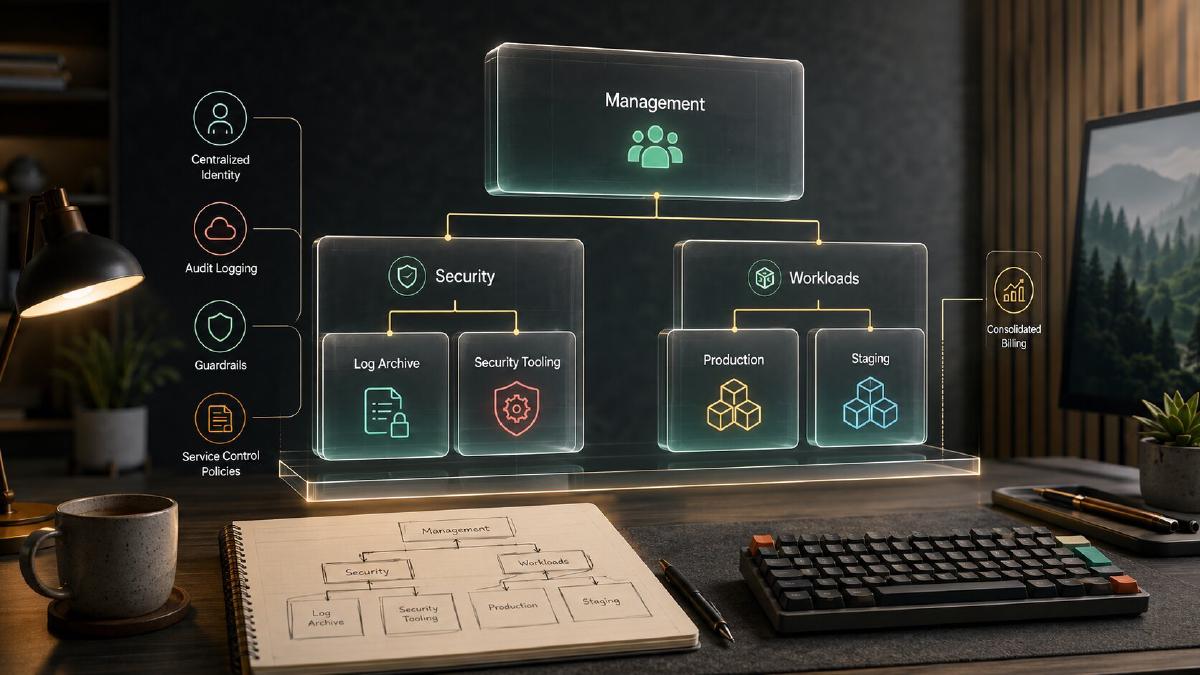
My starting AWS Organizations hierarchy would look like this:
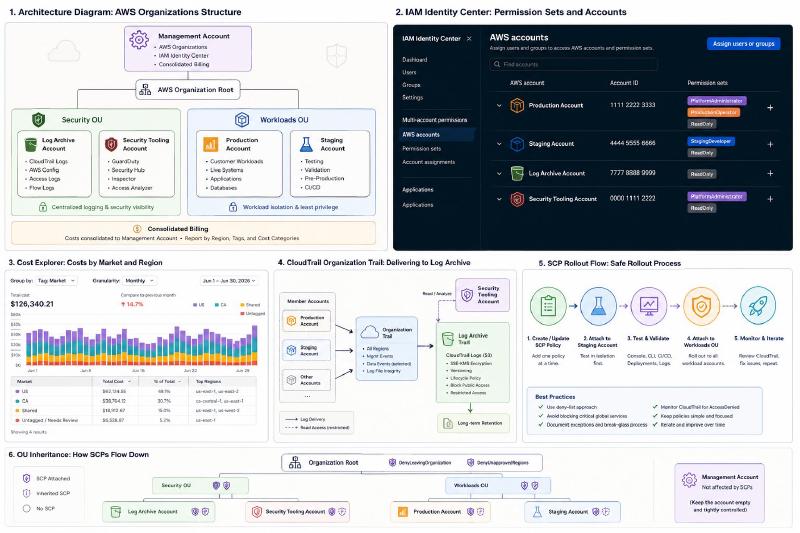
The two organizational units are intentionally broad:
- Security OU contains accounts that protect or observe the environment.
- Workloads OU contains accounts where applications actually run.
I would not start by creating separate organizational units for every department, product, country, or developer. Organizational units are primarily useful when a group of accounts needs to inherit the same policies. AWS recommends organizing accounts around business purpose, function, compliance requirements, and common controls rather than copying the company reporting structure.
What Each Account Is Responsible For#
| Account | Primary responsibility | What should not live there |
|---|---|---|
| Management | AWS Organizations, IAM Identity Center, consolidated billing, account administration | Application workloads, databases, CI runners, shared production services |
| Production | Customer-facing workloads and production data | Staging resources, organization administration |
| Staging | Integration testing, deployment validation, development infrastructure | Production data or production credentials |
| Log Archive | Central CloudTrail, AWS Config, access, and infrastructure logs | General-purpose application workloads |
| Security Tooling | GuardDuty, Security Hub, Inspector, Access Analyzer, security findings | Normal application services |
This is not the only valid structure, but it creates the boundaries that matter most.
A developer accidentally deleting staging resources should not be able to affect production.
A compromised production administrator should not be able to quietly delete the organization’s historical audit logs.
A billing administrator should not require full infrastructure access.
Those are useful security boundaries. Splitting accounts merely because two storefronts serve different countries is not necessarily useful.
Why I Would Not Create Separate US and Canada Accounts#
We are working toward operating both US and Canadian e-commerce workloads, but that does not automatically mean I need a ProductionUS account and a ProductionCA account.
An AWS account should represent a meaningful security, compliance, operational, or failure boundary.
A country is often a reporting dimension before it becomes an infrastructure boundary.
If the US and Canadian platforms:
- Are operated by the same engineering team
- Share the same deployment process
- Use the same security controls
- Have the same administrative access
- Have no regulatory requirement for account-level isolation
- Have resources that are already distinguishable by Region, application, and tags
then creating separate accounts may add operational friction without adding meaningful protection.
I can report costs using native AWS dimensions such as Region and with tags such as:
| |
Cost Explorer can filter AWS costs by dimensions including Region, linked account, service, and tag. Activated cost allocation tags can also be used to categorize costs in consolidated billing reports.
I would create separate country accounts later only if there were a concrete reason, such as:
- Different teams administering each market
- Regulatory or data-residency requirements
- Separate security policies
- Independent deployment lifecycles
- A need to limit the blast radius between markets
- A legal or financial requirement for stronger cost separation
Account boundaries should solve a problem. They should not exist merely because an architecture diagram looks more mature with additional boxes.
Do Not Turn an Existing Production Account Into the Management Account#
This is one of the most important migration decisions.
If an existing AWS account already contains production infrastructure, I would not use that account to create the organization.
The account that creates an AWS Organization becomes the management account. AWS does not let you simply select a different management account later. Migrating a management account requires removing its member accounts and deleting the existing organization before that account can join another organization.
Instead, I would:
- Create a new, empty AWS account.
- Use that account to create the AWS Organization.
- Invite the existing production account into the organization.
- Move the production account into the Workloads OU.
- Create the remaining accounts from the new management account.
AWS explicitly recommends starting with a new account for the management account rather than using an existing workload account.
That gives me a clean management boundary from the beginning.
Keep the Management Account Almost Empty#
The management account is the most privileged account in the organization.
It is responsible for:
- Creating and managing member accounts
- Managing organizational units
- Applying organization policies
- Integrating supported AWS services
- Operating IAM Identity Center
- Managing consolidated billing
It should not run Magento, Next.js, databases, CI/CD runners, monitoring agents, or shared application services.
AWS recommends using the management account only for operations that require it and storing workloads in member accounts. One major reason is that service control policies do not restrict users or roles in the management account.
That last point is easy to overlook.
An SCP attached to the organization root can restrict every member account while doing nothing to protect the management account itself. The management account therefore needs extremely limited access and strong root-account controls.
My management account would contain only:
- AWS Organizations
- IAM Identity Center
- Billing and Cost Management configuration
- Organization-level service integrations
- Possibly infrastructure used exclusively to administer the organization
Anything that can be delegated to the Security Tooling account should be delegated.
Step 1: Secure the Management Account#
Before creating member accounts, I would secure the management account itself.
At a minimum:
- Use a company-controlled email address rather than a personal address.
- Store the root password in an approved password manager.
- Enable multiple MFA devices for the root user.
- Do not create root access keys.
- Limit management-account access to a small number of platform administrators.
- Document the account-recovery process.
- Make sure recovery does not depend entirely on one employee.
AWS recommends using root credentials only for tasks that require them, enabling MFA, avoiding root access keys, and using temporary credentials for normal administration. AWS also supports centralizing root access and removing root credentials from member accounts.
For account email addresses, I prefer explicit distribution aliases:
| |
I prefer these over tying an account to a specific employee.
An employee can leave. The account email address needs to remain under company control.
Step 2: Create the Organization With All Features Enabled#
AWS Organizations supports a consolidated-billing-only mode and an all-features mode.
For a new organization, I would use all features.
Service control policies and most useful AWS service integrations require all features to be enabled. All features is also the default and preferred mode for new organizations.
Using the AWS CLI:
| |
Then retrieve the organization root ID:
| |
Before inviting an existing production account, verify the management account email address. AWS requires management-account email verification before existing accounts can be invited into the organization.
Step 3: Create the Organizational Units#
I would create only two OUs initially:
| |
Policies attached to an OU are inherited by the accounts inside it, which lets me apply security controls to groups of accounts without maintaining the same policy attachment repeatedly.
I would resist the urge to build a deep OU hierarchy immediately.
A small team does not need this on day one:
| |
That structure may eventually be useful, but an OU should be created because a set of accounts needs common controls—not because it appeared in an enterprise reference diagram.
Step 4: Create the Member Accounts#
Accounts created through AWS Organizations automatically become members of the organization.
For example:
| |
Account creation is asynchronous. The initial command returns a request ID, which is then used to check the status.
| |
A successful response includes the new AWS account ID:
| |
I would repeat the process for:
| |
After creation, move each account from the organization root into the appropriate OU:
| |
The production and staging accounts go into Workloads.
The log archive and security accounts go into Security.
Use Predictable Account Names#
Account names should communicate purpose immediately.
My preferred format is:
| |
For example:
| |
I would avoid abbreviating these to names such as:
| |
Account names are read by humans far more often than they are parsed by machines. Saving five characters is not worth making an incident harder to understand.
I would also avoid putting the primary AWS Region in the account name:
| |
An account can contain resources in multiple Regions, and the preferred Region may change. Region belongs in infrastructure configuration and cost reporting, not necessarily in the permanent account identity.
AWS recommends using account names, email addresses, and account tags that reflect the account’s usage, environment, project, cost center, and ownership.
Step 5: Configure IAM Identity Center#
I would not create a separate collection of IAM users inside every account.
IAM Identity Center provides one place to manage users, groups, AWS account assignments, and permission sets across the organization. Permission sets can be assigned to multiple accounts, and users can have more than one permission set available when they sign in.
For a small team, the built-in IAM Identity Center directory is a reasonable starting point.
I would create groups instead of assigning every user individually:
| |
Starting Permission Sets#
I would begin with the following permission sets:
| Permission set | Intended use | Suggested session |
|---|---|---|
| OrganizationAdministrator | Rare organization and management-account administration | 1 hour |
| PlatformAdministrator | Infrastructure administration in member accounts | 1 hour |
| StagingDeveloper | Normal development and deployment work in staging | 8 hours |
| ProductionOperator | Restricted production deployment and operational access | 2 hours |
| ReadOnly | Troubleshooting and visibility without modification | 8 hours |
| BillingReadOnly | Cost Explorer, budgets, and invoice visibility | 4 hours |
IAM Identity Center permission-set sessions default to one hour and can be configured for up to 12 hours. AWS recommends giving administrators additional, less-privileged permission sets so they do not have to use full administrative access for routine work.
That means I might have both of these available when I sign in:
| |
For routine investigation, I would select ReadOnly.
I would use PlatformAdministrator only when I actually need to change something.
Starting Account Assignment Matrix#
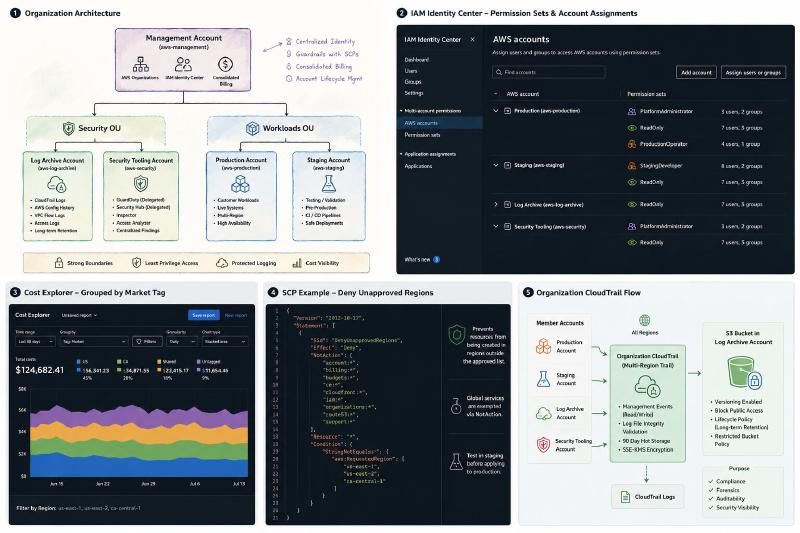
| Group | Management | Production | Staging | Log Archive | Security |
|---|---|---|---|---|---|
| Platform Admins | OrganizationAdministrator | PlatformAdministrator | PlatformAdministrator | ReadOnly | PlatformAdministrator |
| Developers | None | ProductionOperator or ReadOnly | StagingDeveloper | None | None |
| Read Only | None | ReadOnly | ReadOnly | ReadOnly | ReadOnly |
| Billing | BillingReadOnly | None | None | None | None |
The exact production permissions will depend on the deployment architecture.
For example, developers may need to:
- Start a CodePipeline execution
- Read ECS or EC2 deployment status
- View CloudWatch logs
- Inspect load balancer target health
- Read deployment artifacts
- Trigger a controlled rollback
They probably do not need permission to:
- Modify organization policies
- Create IAM administrators
- Delete production databases
- Disable GuardDuty
- Delete audit logs
- Change account-level billing configuration
I would initially use AWS-managed policies to establish a functional baseline, observe the actual permissions being used, and then replace broad access with custom production permission sets. AWS recommends moving toward least privilege after evaluating which permissions administrators and developers actually use.
Using IAM Identity Center From the CLI#
Engineers can configure an AWS CLI profile using IAM Identity Center:
| |
A profile might look like this:
| |
Then authenticate:
| |
And run commands normally:
| |
This removes the need to distribute long-lived IAM access keys to every engineer.
Step 6: Centralize Logging in the Log Archive Account#
The Log Archive account exists so that application administrators are not also the sole custodians of the records describing their actions.
At minimum, I would store the following centrally:
- AWS CloudTrail organization logs
- AWS Config history
- VPC Flow Logs where appropriate
- Load balancer access logs
- CloudFront logs
- S3 access logs for sensitive buckets
- Other long-term security and infrastructure logs
The log account should not be treated as a normal shared-services account. It should have extremely limited write and delete access.
Organization CloudTrail#
I would create one multi-Region organization trail and send it to an S3 bucket owned by the Log Archive account.
An organization trail records events for the management account and member accounts. New accounts added to the organization are automatically included, and member accounts can view the trail but cannot modify or delete it.
My starting configuration would include:
- All enabled AWS Regions
- Read and write management events
- Log-file integrity validation
- SSE-KMS encryption
- S3 versioning
- S3 Block Public Access
- A lifecycle policy
- Restricted bucket and KMS key policies
I would not blindly enable every possible CloudTrail data event across the organization on day one.
Management events provide the broad administrative audit trail. Data events should be enabled intentionally for high-value resources such as sensitive S3 buckets, important Lambda functions, and other workloads where object- or function-level auditing is useful.
The S3 bucket policy and KMS key policy are critical. CloudTrail must be able to write logs, while engineers in production and staging should not be able to delete or overwrite them. AWS documents additional bucket-policy requirements when an S3 bucket receives organization-trail logs.
Security Tooling Account#
The Security Tooling account should be the delegated administrator for services such as:
- Amazon GuardDuty
- AWS Security Hub
- Amazon Inspector
- IAM Access Analyzer
- AWS Config aggregation
AWS recommends delegating supported security services away from the management account. GuardDuty and Security Hub both support a delegated administrator account, and AWS recommends against using the Organizations management account as the GuardDuty administrator.
This keeps security findings and administration outside both the production account and the management account.
Step 7: Configure Billing Without Creating a Billing Account#
The management account is the payer for the organization.
AWS Organizations consolidates the charges from all member accounts, and the management account is responsible for paying those charges.
I do not need a separate workload account named Billing.
Instead, I would grant the aws-billing IAM Identity Center group read-only billing access to the management account.
My Starting Tagging Standard#
At minimum, I would require these tags where the AWS service supports them:
| |
Example values:
| |
For infrastructure shared between markets:
| |
I would not create a custom Region tag because AWS already exposes Region as a native billing dimension.
Cost Allocation Strategy#
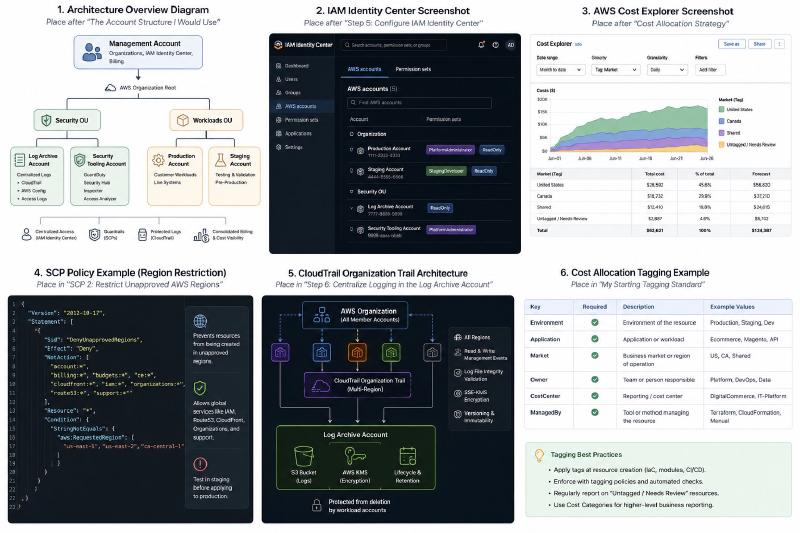
For market-level reporting, I would use:
- Native Region grouping
- Activated
Marketcost allocation tags Applicationtags- Linked-account grouping
- AWS Cost Categories for higher-level reporting
For example, an AWS Cost Category named Market could contain rules such as:
| |
AWS Cost Categories can group AWS costs into internal business structures, while cost allocation tags provide more granular resource-level categorization.
One important detail is that the consolidated bill does not automatically mirror the OU hierarchy. AWS recommends using cost allocation tags when the organization’s account and OU structure does not match the desired billing report.
That is another reason not to create OUs or accounts solely for reporting.
Step 8: Add a Small Number of SCP Guardrails#
Service control policies are one of the most valuable parts of AWS Organizations, but they are also one of the easiest ways to break an environment.
An SCP does not grant access.
It defines the maximum permissions that IAM users and roles in affected member accounts can receive. Even an identity with AdministratorAccess cannot perform an action explicitly denied by an SCP.
I would begin with a deny-list strategy.
That means leaving the default FullAWSAccess SCP attached and adding a few explicit deny policies for actions that should almost never occur.
AWS uses this deny-list approach in its SCP examples and recommends testing policies on a limited scope before gradually applying them more broadly.
SCP 1: Prevent Accounts From Leaving the Organization#
A member account should not be able to remove itself from the organization accidentally or maliciously.
| |
A member account can normally leave an organization if the caller has organizations:LeaveOrganization. An organization administrator can remove that ability with a policy.
I would attach this policy to the organization root so it applies to all member accounts.
SCP 2: Restrict Unapproved AWS Regions#
Unrestricted Regions create cost, security, and observability problems.
An engineer can accidentally create infrastructure in a Region that is not covered by the team’s normal logging, monitoring, deployment, or incident-response processes.
Here is a starting region-deny policy:
| |
The approved Region list must be changed to match the actual architecture.
The NotAction section is important. Several global AWS services use endpoints associated with a specific Region, often us-east-1. A simplistic region-deny policy can unintentionally block IAM, Route 53, CloudFront, Support, Organizations, or billing functionality. AWS specifically warns that global services need exceptions in this type of policy.
I would test this against the staging account before attaching it to production.
SCP 3: Protect Audit and Security Services#
The organization trail already prevents member accounts from modifying the organization-level CloudTrail configuration. I would still protect the surrounding audit and security services from routine administrators.
| |
This example assumes a controlled OrganizationSecurityAdmin role exists for exceptional administrative work.
The exact action list should match the services being centrally managed. AWS Config exposes operations that stop or delete its recorder and delivery channel, and GuardDuty exposes operations that delete a detector or disassociate a member account from its administrator.
This policy needs careful testing. A deny in an SCP cannot be overridden by adding another IAM policy.
SCP 4: Restrict Member-Account Root Usage#
My preference is to use AWS centralized root-access management and remove root credentials from member accounts.
AWS recommends removing root credentials from member accounts where possible. Newly created member accounts can then operate without independently usable root credentials.
For environments that have not adopted centralized root management, an SCP can restrict member-account root activity:
| |
This applies only to member accounts because authorization SCPs do not restrict the organization’s management account.
Before attaching it, I would document how the team will perform the small number of operations that genuinely require member-account root access.
My SCP Rollout Process#
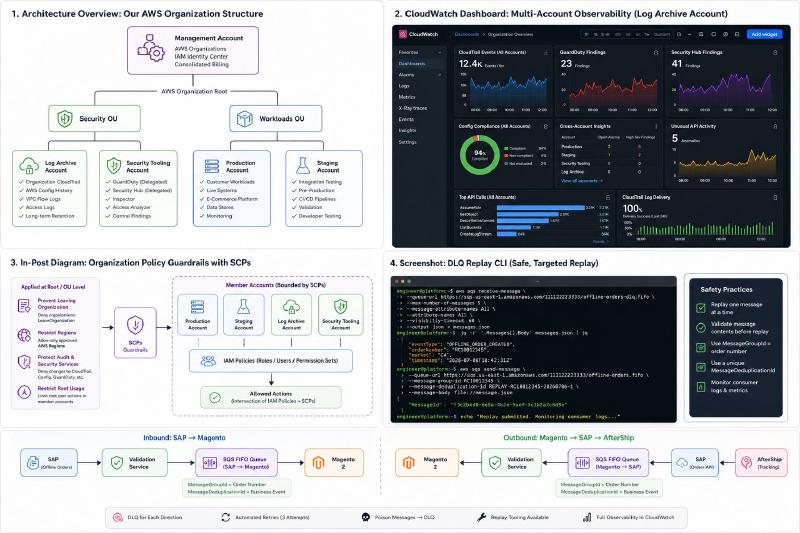
I would never write a collection of SCPs and immediately attach them all to the organization root.
My rollout process would be:
- Keep the default
FullAWSAccessSCP attached. - Add one deny policy at a time.
- Attach the policy directly to the staging account first.
- Test console access, CLI access, CI/CD, deployments, backups, and incident tooling.
- Review CloudTrail for unexpected access-denied events.
- Attach the policy to the Workloads OU.
- Validate production again.
- Expand root-level policies only when they truly apply to every member account.
The staging account is not only for application testing. It is also where I can validate changes to organizational guardrails before they affect production.
Do I Need AWS Control Tower?#
Not necessarily.
AWS Control Tower can automate a landing zone, create shared accounts, apply controls, and standardize account enrollment. It becomes valuable when a company is repeatedly creating accounts or needs a larger catalog of preventive and detective controls.
For a small team with five accounts, I would start with:
- AWS Organizations
- IAM Identity Center
- A Log Archive account
- A Security Tooling account
- An organization CloudTrail
- Delegated security administrators
- A small SCP library
- Infrastructure as code for account baselines
That keeps the architecture understandable.
I would consider adding Control Tower when:
- New accounts are being created regularly
- Account provisioning needs to be self-service
- Compliance controls need standardized deployment
- Multiple teams own separate workloads
- Manual account bootstrapping is becoming inconsistent
- The organization needs stronger governance reporting
I would not add it merely because it appears in every enterprise AWS landing-zone diagram.
Baseline Configuration for Every Member Account#
Creating the accounts is only the beginning.
Every member account should receive a consistent baseline.
My initial checklist would include:
- IAM Identity Center account assignments
- Root-access controls
- Account contacts and alternate security contacts
- Organization CloudTrail enrollment
- AWS Config configuration
- GuardDuty enrollment
- Security Hub enrollment
- Amazon Inspector enrollment where applicable
- S3 Block Public Access
- Default EBS encryption
- Cost-allocation tags
- A monthly account budget
- Cost-anomaly notifications
- Approved-Region enforcement
- Standard deployment roles
- Standard break-glass procedures
I would eventually manage this baseline through infrastructure as code or CloudFormation StackSets rather than manually configuring each account.
The important part is that a newly created account should not remain an unmonitored blank slate.
Account Naming Is Not Resource Naming#
One mistake I see in AWS account planning is attempting to encode the entire platform architecture in the account name.
For example:
| |
That name mixes:
- Company
- Market
- Environment
- Application
- Region
Most of those dimensions belong in resource names and tags.
The account itself only needs to communicate its long-lived administrative purpose:
| |
Inside that account, resources can be tagged:
| |
Although I would omit a custom Region tag when the native AWS Region dimension already provides the required reporting.
Simple account names are easier to maintain when architectures change.
Common Gotchas#
SCPs Do Not Grant Access#
Attaching an SCP containing an Allow statement does not automatically give anyone permission.
A principal still needs an identity or resource policy that grants the action. The SCP only establishes the outer permission boundary.
AdministratorAccess Does Not Override an SCP#
A role with the AWS-managed AdministratorAccess policy still cannot perform an action denied by an inherited SCP.
That is the entire purpose of the guardrail.
It is also why SCPs need a controlled rollout.
Region Deny Policies Can Break Global Services#
IAM, Route 53, CloudFront, Organizations, Support, and some billing services do not behave like normal regional services.
A region-deny policy without global-service exceptions can create confusing failures in both the console and CLI.
The Management Account Is Not Protected by SCPs#
This is why the management account should not contain workloads.
It is also why only a tiny number of administrators should have access to it.
Account Creation Is Asynchronous#
Automation should wait for the CreateAccount request to reach SUCCEEDED and retrieve the resulting account ID before attempting to move or bootstrap the account.
Central Logs Need More Than an S3 Bucket#
The bucket policy, KMS key policy, lifecycle policy, public-access configuration, and administrative permissions all matter.
A central bucket that every production administrator can empty is not a meaningful log archive.
Tags Are a Governance Process#
A tag standard written in a document does not guarantee that resources will be tagged.
Tagging needs to be built into:
- Terraform modules
- CloudFormation templates
- CI/CD validation
- Account baselines
- Resource-creation workflows
- Periodic reporting
An Untagged or Needs Review cost category is useful because it makes missing ownership visible.
What I Would Not Build Yet#
For this size of team, I would not start with:
- Separate accounts for every developer
- Separate accounts for the US and Canada without a concrete isolation requirement
- A dedicated networking account before centralized networking exists
- A shared-services account with no actual shared services
- Ten nested organizational units
- A giant SCP allow list
- Separate production accounts for every microservice
- A custom identity provider integration before the built-in directory becomes limiting
- Control Tower solely to say we use Control Tower
Those may all become reasonable later.
The point is to let the organization grow in response to real operational requirements.
The Final Architecture#
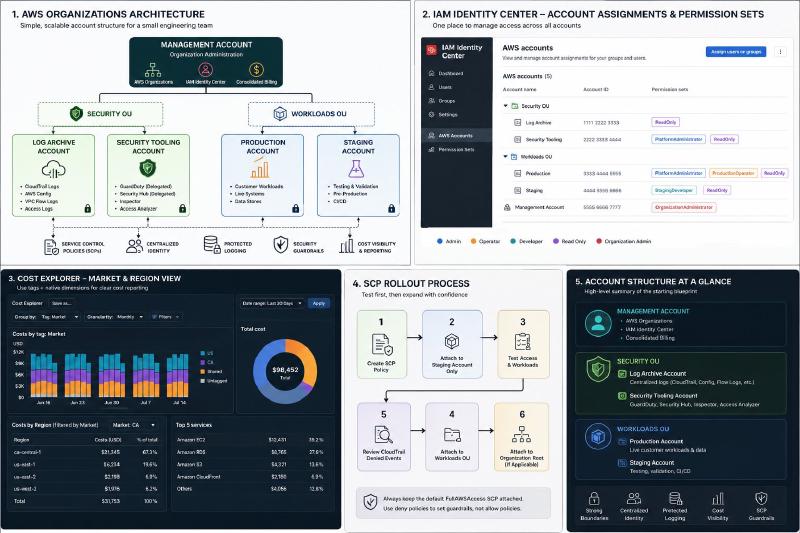
The finished starting point is intentionally small:
| |
Billing is handled through linked accounts, native Region dimensions, cost allocation tags, and Cost Categories.
Access is handled through IAM Identity Center.
Security visibility is delegated to the Security Tooling account.
Audit logs are stored in the Log Archive account.
Production and staging remain separate failure and administrative boundaries.
That is enough structure to solve the problems a small engineering team actually has without pretending the team is operating a 500-account enterprise.
Conclusion#
AWS Organizations does not need to be complicated to be valuable.
The biggest improvements come from a few straightforward decisions:
- Keep the management account empty.
- Separate production from staging.
- Store audit logs outside the workload accounts.
- Delegate security tooling away from the management account.
- Centralize human access with IAM Identity Center.
- Use tags and native billing dimensions before creating accounts purely for cost reporting.
- Start with a small number of carefully tested SCPs.
- Add accounts and OUs only when they create a meaningful boundary.
The architecture should make the environment easier to understand, not harder.
For my team, five accounts create the right starting balance: enough isolation to reduce risk, but still small enough that every engineer can understand why each account exists.
That is the kind of AWS Organizations setup I want—one that gives us room to grow without building an organizational science project before we need one.