A successful deployment action does not necessarily mean that an application is working.
It may only mean that AWS completed the mechanical portion of the deployment:
- Amazon ECS accepted a new task definition.
- New Fargate tasks entered a running state.
- A container image was pulled successfully.
- A new Amazon Machine Image was created.
- An EC2 launch template was updated.
- An Auto Scaling group replaced its instances.
- An Application Load Balancer marked enough targets healthy.
- CodePipeline reached the end of its deployment stage without reporting an infrastructure-level failure.
Those are important signals, but none of them prove that a customer can load the storefront, retrieve product data, search the catalog, or communicate with the backend.
That gap is where smoke tests belong.
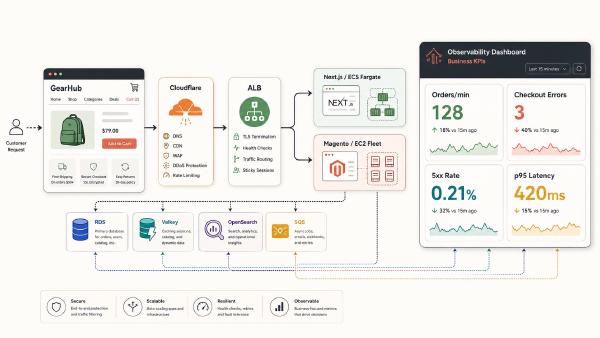
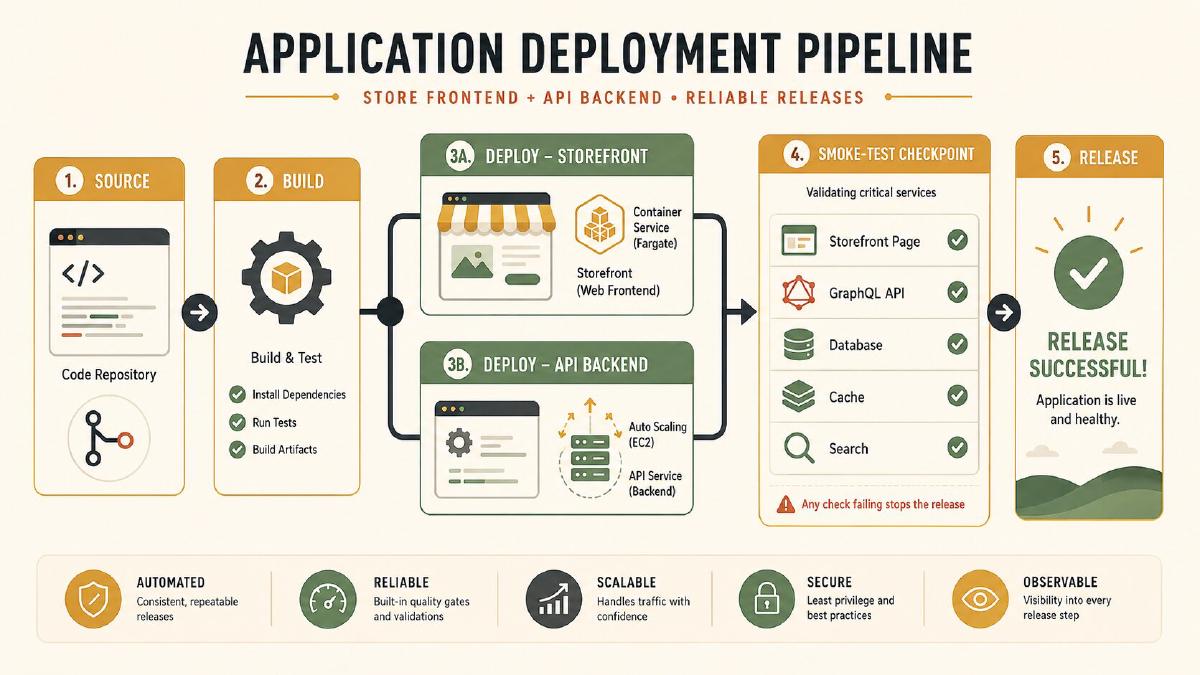
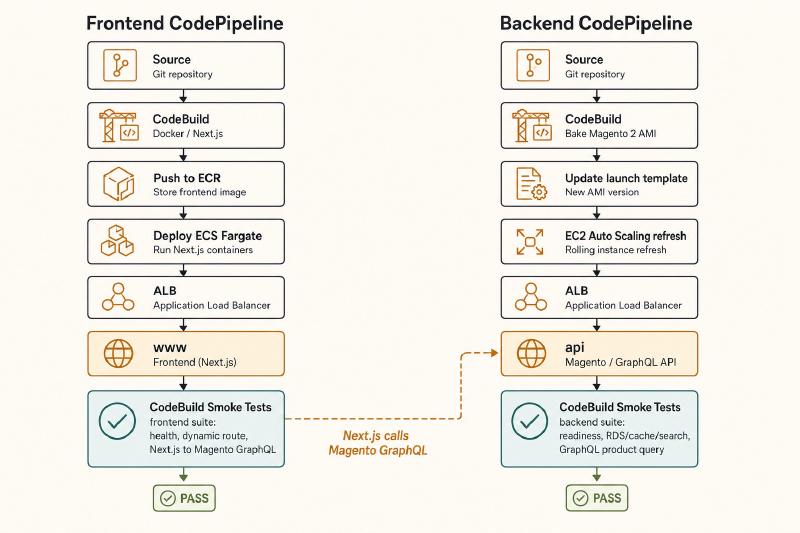
In my environment, the frontend and backend are not deployed by one combined pipeline. They have separate repositories, separate artifacts, separate deployment processes, and separate AWS CodePipeline pipelines.
The frontend pipeline builds a Next.js container and deploys it to an Amazon ECS service running on Fargate.
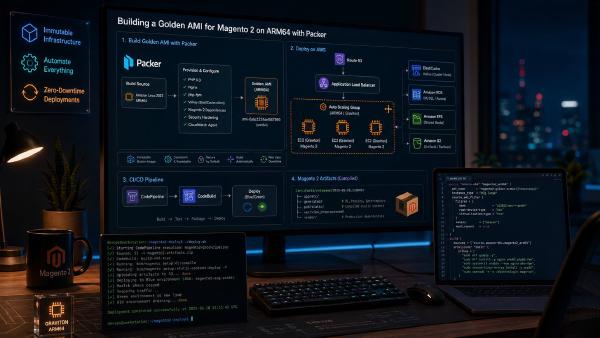
The backend pipeline builds an immutable AMI containing Magento 2, PHP, Nginx, the required PHP extensions, and the supporting runtime configuration. That AMI is then deployed through an EC2 Auto Scaling group.
Each pipeline has its own post-deployment smoke-test stage.
The implementation pattern is similar in both pipelines, but the deployment-completion signals and the tests performed are different.
| |
| |
The important architectural principle is simple:
Two pipelines. Two deployment mechanisms. Two purpose-built smoke-test stages. One reusable validation pattern.
What a Smoke Test Should Prove#
A smoke test is a small, fast set of checks that determines whether a newly deployed release is fundamentally usable.
It should answer a focused question:
Did this deployment produce an application that can serve its most important traffic?
Smoke testing is not the same as running the entire automated test suite.
Unit tests should already have run before the application was packaged.
Integration tests should have validated important component interactions before production deployment.
Static analysis, linting, dependency checks, and security scanning should already have completed.
Smoke tests run after deployment against the environment that just changed.
For an e-commerce platform, I generally want smoke tests to cover four layers.
1. Infrastructure Reachability#
Can the deployed application receive and answer requests?
Examples include:
- DNS resolves.
- TLS negotiation succeeds.
- The load balancer returns a response.
- The expected hostname reaches the correct application.
- Redirects behave correctly.
- The application responds within an acceptable timeout.
2. Application Health#
Is the application functioning rather than merely running?
Examples include:
- The frontend health endpoint returns
200. - The backend health endpoint returns
200. - The response contains the expected service identifier.
- The deployed version matches the expected release.
- The response is not a generic load-balancer, proxy, PHP, or framework error page.
3. Dependency Health#
Can the application reach the dependencies required to serve traffic?
Depending on the application, that may include:
- Amazon RDS.
- Redis or Valkey.
- OpenSearch.
- A GraphQL backend.
- A search provider.
- A queue.
- Required configuration from Secrets Manager or Parameter Store.
A readiness endpoint should return controlled, sanitized results. It should not expose connection strings, credentials, hostnames, or other sensitive diagnostic information.
For example:
| |
4. Critical Business Behavior#
Can the application perform one or two operations that matter to an actual customer?
For an e-commerce platform, useful checks might include:
- Load the home page.
- Load a known category page.
- Load a known product page.
- Execute a read-only GraphQL query.
- Verify that product search returns a valid response.
- Confirm that Next.js can communicate with Magento.
- Optionally exercise a dedicated read-only smoke SKU or a disposable anonymous cart that is never left behind.
The important constraint is that smoke tests should be safe, repeatable, and idempotent.
I do not want a deployment smoke test to:
- Place a real order.
- Send customer email.
- Reserve production inventory.
- Trigger fulfillment.
- Create permanent customer records.
- Pollute analytics.
- Depend on frequently changing merchandising content.
Why Load Balancer Health Checks Are Not Enough#
It is tempting to treat Application Load Balancer health checks as smoke tests.
They are not.
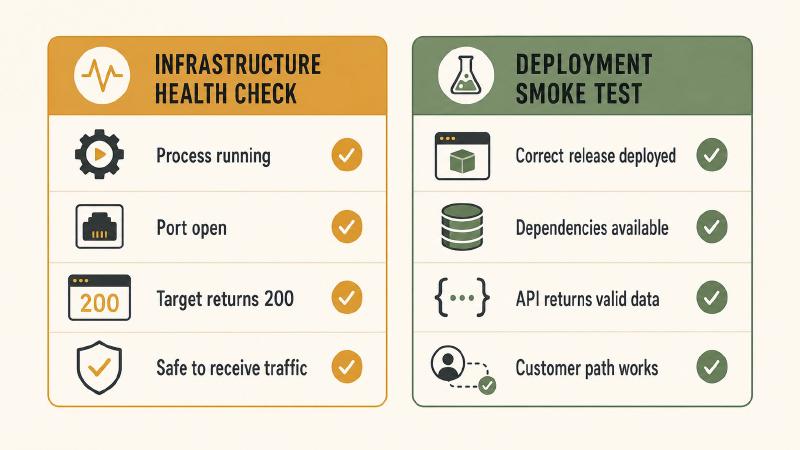
A load-balancer health check is deliberately narrow. It should determine whether a target is safe to receive traffic. It is designed to run frequently and complete cheaply.
A target can pass its ALB health check while the release is broken in ways such as:
- The home page produces a JavaScript exception.
- Next.js cannot call the Magento GraphQL API.
- A required runtime environment variable is missing.
- PHP-FPM is running but Magento fails during bootstrap.
- Redis authentication fails.
- OpenSearch is unavailable.
- Product search returns no results.
- A backend module fails only on a specific application route.
- The deployed container or AMI contains an older build than expected.
- The application returns a branded error page with HTTP
200. - A CDN serves cached content while the origin is broken.
I use both health checks and smoke tests, but they serve different purposes.
- Health checks decide whether an individual target should receive traffic.
- Smoke tests decide whether the deployed release should be trusted.
The Two Pipeline Architectures#
The frontend and backend follow the same high-level release pattern, but the implementation differs.
Frontend CodePipeline#
The frontend pipeline handles the Next.js application.
| |
The frontend smoke-test stage should verify:
- The newly deployed Next.js service is reachable.
- A dynamic health route executes successfully.
- The expected frontend release is active.
- A server-rendered or otherwise origin-dependent route works.
- A stable product or category page loads.
- Next.js can communicate with Magento.
- The public customer path through the edge layer works.
Backend CodePipeline#
The backend pipeline handles Magento 2 and the PHP runtime.
| |
The backend smoke-test stage should verify:
- Nginx is serving requests.
- PHP-FPM is processing Magento requests.
- Magento can bootstrap successfully.
- The expected backend release or AMI version is active.
- Magento can reach RDS.
- Magento can reach Redis or Valkey.
- Magento can reach OpenSearch.
- A representative GraphQL query returns valid product data.
- The public or internal API hostname reaches the expected backend.
Repository Layout#
Because the frontend and backend are deployed separately, I keep their smoke tests with their respective repositories.
Frontend Repository#
| |
Backend Repository#
| |
The common shell helper can be duplicated, distributed through an internal package, or maintained in a shared deployment repository.
What matters is that each pipeline receives the tests it needs as part of its own source or deployment artifact.
Keeping smoke tests in source control gives me:
- Reviewable changes.
- Versioning alongside the application.
- A history of which checks protected each release.
- Reusable scripts for staging and manual troubleshooting.
- Separate ownership between frontend and backend validation.
Step 1: Define Purpose-Built Health Endpoints#
Before adding CodeBuild to either pipeline, I want purpose-built application endpoints.
These endpoints are application code. They are not automatically provided by CodePipeline, ECS, EC2, Next.js, Magento, or the load balancer.
Example frontend endpoints:
| |
Example backend endpoints:
| |
I separate liveness from readiness whenever possible.
Liveness#
Liveness answers:
Is the application process running well enough that it should not be restarted?
A liveness endpoint should be shallow and inexpensive.
Frontend example:
| |
Backend example:
| |
Readiness#
Readiness answers:
Can this deployment actually serve application traffic?
A backend readiness endpoint may check essential dependencies:
| |
I avoid turning readiness into an exhaustive diagnostic endpoint.
If every readiness request performs expensive database queries, large OpenSearch requests, or repeated cache writes, the health system can become part of the outage.
The checks should be:
- Lightweight.
- Read-only where possible.
- Bounded by strict timeouts.
- Limited to dependencies required for normal traffic.
- Safe to run repeatedly.
- Sanitized so they do not expose infrastructure details.
Step 2: Create Shared Shell Helpers#
Both repositories can use the same basic helper functions.
| |
Use Strict Shell Behavior#
| |
This prevents common shell failures from being silently ignored.
-estops execution when a command fails.-urejects undefined variables.-o pipefailcatches failures inside pipelines.-Epreserves error handling through functions.
Bound Every Network Request#
Every curl request has both a connection timeout and a total timeout.
A deployment pipeline should not hang indefinitely because a server accepted a connection but never returned a response.
Retry Reachability, Not Broken Assertions#
Immediately after a deployment, the application may need a short stabilization period.
I retry the initial availability check because an endpoint may legitimately become available a few seconds later.
Once the endpoint is reachable, I do not repeatedly retry malformed JSON, the wrong service identifier, failed dependency checks, or an incorrect release version. Those indicate an application or deployment problem rather than simple startup delay.
Sample the Release More Than Once#
A rolling deployment may temporarily contain more than one task or instance version.
One request is not enough to prove that the expected release is consistently serving traffic.
The assert_release_consistently_served helper samples the endpoint repeatedly so the test is more likely to detect a mixed fleet.
Step 3: Add Frontend Smoke Tests#
The frontend smoke test runs only in the frontend CodePipeline.
It checks:
- Frontend health.
- The expected Next.js release.
- A public page.
- A known product or category page.
- A dynamic Next.js route.
- Next.js-to-Magento communication.
| |
Why the Frontend Needs a Dynamic Integration Check#
A Next.js task may be running and serving static content while its Magento connection is broken.
This can happen because of:
- An incorrect backend URL.
- Missing environment variables.
- Incorrect server-side headers.
- Authentication changes.
- DNS failures.
- Network-policy changes.
- GraphQL contract changes.
- Runtime configuration that differs from the build environment.
A controlled route such as:
| |
can execute a tiny read-only request from Next.js to Magento and return a sanitized result:
| |
That proves more than simply loading a cached page.
Origin Validation Versus Customer-Path Validation#
For the frontend, I separate two types of smoke testing.
Origin Deployment Validation#
| |
This validates the deployment itself.
It helps answer:
- Did the new tasks start?
- Can they serve dynamic requests?
- Is the expected release active?
- Can Next.js reach Magento?
Customer-Path Validation#
| |
This validates the route customers actually use.
It helps answer:
- Does public DNS work?
- Does TLS work?
- Does the edge route traffic correctly?
- Are security rules allowing legitimate customer traffic?
- Can the storefront reach the backend through the production path?
These checks answer different questions.
A public request through Cloudflare does not guarantee that the test reached a newly deployed Fargate task. A direct origin test does not prove that the public customer path works.
For a production deployment, I prefer both.
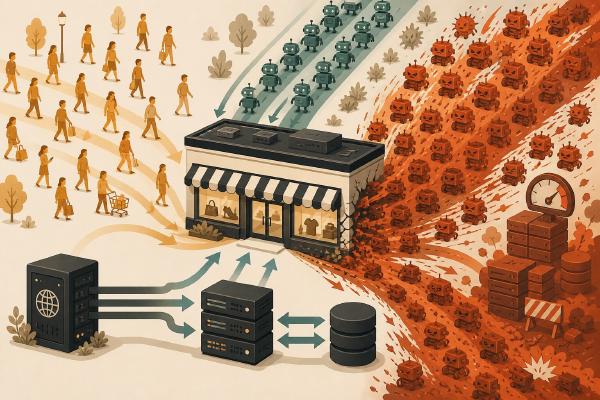
Cloudflare and Bot Protection#
Automated smoke tests can look like bot traffic.
A CodeBuild job may repeatedly call:
- A health endpoint.
- A product page.
- A GraphQL route.
- A controlled integration endpoint.
Cloudflare may classify those requests as automated, challenge them, rate-limit them, or block them.
The solution should not be to disable security controls globally.
Safer patterns include:
- A signed request header validated at the edge and origin.
- A narrowly scoped skip rule for an authenticated smoke-test path.
- A short-lived token.
- A private validation hostname.
- An internal ALB test followed by one small public validation.
- Mutual TLS for an internal route.
- A tightly controlled service token.
A difficult-to-guess URL is not authentication.
| |
That path will eventually be discovered.
The smoke-test route should require an actual authentication or network control.
Step 4: Add Backend Smoke Tests#
The backend smoke test runs only in the backend CodePipeline.
It verifies:
- Magento health.
- PHP and application readiness.
- The expected backend release.
- RDS connectivity.
- Redis or Valkey connectivity.
- OpenSearch connectivity.
- A representative GraphQL product query.
| |
Use Stable Test Data#
The GraphQL test deliberately queries a controlled product.
I do not want a deployment test to depend on whichever product happens to be popular, active, or in stock today.
Merchandising changes could remove that product and fail an otherwise healthy release.
A dedicated smoke-test entity should be:
- Stable.
- Safe to query repeatedly.
- Excluded from ordinary merchandising where practical.
- Managed as part of the platform’s test data.
- Free of real customer information.
- Unlikely to trigger inventory, pricing, or fulfillment side effects.
The query should remain read-only unless there is a strong reason to test a mutation.
Step 5: Create the Frontend CodeBuild Buildspec#
The frontend smoke-test project receives the frontend repository as its input artifact.
| |
The important detail is that the expected release version comes from deployment metadata, not from an assumption about the current CodeBuild source revision.
Step 6: Create the Backend CodeBuild Buildspec#
The backend smoke-test project receives the backend source and deployment metadata produced by the deployment stage.
| |
The baseline shell implementation does not generate JUnit XML, so I do not configure a CodeBuild report group here.
If I later move the tests to pytest, Playwright, or another framework that emits structured results, I can add CodeBuild report configuration then.
Step 7: Produce Deployment Metadata#
A smoke test should validate the deployment that actually happened.
It should not assume that the current Git revision, image tag, task-definition revision, launch-template version, and AMI all refer to the same release unless the deployment process explicitly records that relationship.
Each pipeline should produce a small metadata file.
Frontend Deployment Metadata#
| |
Backend Deployment Metadata#
| |
The deployment stage publishes this file as an output artifact.
The smoke-test stage reads it and compares the expected release against the runtime health endpoint.
This is more reliable than assuming:
| |
That assumption may not hold when:
- The image was rebuilt.
- An AMI was promoted between environments.
- A task definition was revised independently.
- A deployment reused an existing artifact.
- A pipeline execution was retried.
- The source and deployment stages used different artifacts.
Step 8: Store Configuration Outside the Scripts#
Environment-specific URLs and test identifiers belong in Parameter Store rather than being hard-coded into shell scripts.
Frontend examples:
| |
Backend examples:
| |
Secrets Manager should be reserved for actual secrets such as:
- API tokens.
- Signed-request credentials.
- Private test-route credentials.
- Service tokens.
Do not store secrets as ordinary plaintext CodeBuild environment variables in CloudFormation or in the CodePipeline console.
Step 9: Create Separate CodeBuild Projects#
I use two smoke-test CodeBuild projects.
| |
Each project has:
- Its own IAM role.
- Its own log group.
- Its own timeout.
- Its own network configuration.
- Its own Parameter Store paths.
- Its own Secrets Manager access.
- Its own input artifacts.
- Its own buildspec.
- No deployment permissions it does not need.
The frontend smoke-test role does not need permission to update ECS.
The backend smoke-test role does not need permission to update launch templates or Auto Scaling groups.
Smoke-test projects should validate deployments, not perform them.
Example Frontend CodeBuild Project#
| |
The backend project follows the same pattern but receives access only to the backend configuration paths and artifacts.
If the project runs inside a VPC, its role also needs the permissions required for CodeBuild to create and manage network interfaces.
Step 10: Add the Frontend Smoke-Test Stage#
The frontend pipeline deploys the container to ECS and then runs the frontend smoke tests.
| |
The smoke-test action should not begin until the deployment workflow has reached the state I intend to test.
When the deployment process is custom, I explicitly wait for ECS service stability:
| |
I do not rely only on the fact that CodePipeline advanced to the next stage.
Step 11: Add the Backend Smoke-Test Stage#
The backend pipeline has separate AMI build, deployment, and smoke-test stages.
| |
The deployment project is responsible for:
- Reading the AMI ID.
- Creating or selecting the launch-template version.
- Updating the Auto Scaling group.
- Starting the replacement process.
- Waiting for the intended deployment to complete.
- Verifying target-group health.
- Publishing deployment metadata.
The smoke-test project begins only after that process reports completion.
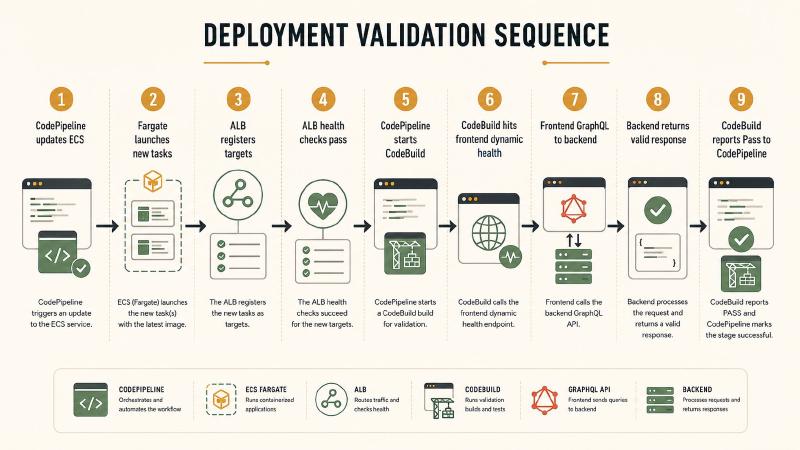
Frontend Fargate Deployment Considerations#
The frontend deployment has a different failure profile from the backend.
A Fargate task can:
- Start successfully.
- Pull the container image.
- Pass a shallow health check.
- Register with the target group.
- Still fail real application traffic.
Examples include:
- Next.js starts with an incorrect backend URL.
- A server-side environment variable is missing.
- The health route works but product pages fail.
- Static content works while dynamic rendering fails.
- The application cannot resolve the backend hostname.
- The wrong image digest was deployed.
- Only some tasks are running the new release.
Wait for ECS Stability#
The smoke tests should begin only after ECS reports the service as stable.
That reduces the chance that the smoke-test stage starts while:
- Tasks are still launching.
- Targets are still registering.
- The deployment is still replacing old tasks.
- The service has not reached its desired count.
Validate the Release Repeatedly#
A rolling deployment may briefly contain both old and new tasks.
A single version response does not prove that all traffic reaches the new release.
Repeated sampling helps identify mixed deployment state.
Do Not Test Only Cached Content#
A CDN can hide a broken origin.
A request to / may succeed because the edge serves cached HTML even when the newly deployed Next.js tasks are broken.
I include at least one request that:
- Is intentionally uncacheable.
- Reaches server-side application logic.
- Includes a unique query value where safe.
- Exercises Next.js-to-Magento communication.
The application route should return headers such as:
| |
A request header such as Cache-Control: no-cache is helpful, but it should not be the only protection against cached smoke-test responses.
Backend AMI Deployment Considerations#
The backend deployment has a different set of risks.
A new EC2 instance can:
- Boot successfully.
- Pass EC2 system checks.
- Register with the target group.
- Return
200from a shallow Nginx route. - Still have an incomplete or broken Magento installation.
Possible causes include:
- PHP-FPM failed to load an extension.
- Magento generated code is missing.
- File permissions are incorrect.
- A mounted configuration file is missing.
- Redis credentials are invalid.
- OpenSearch is unreachable.
- PHP opcache contains unexpected state.
- Nginx and PHP-FPM disagree about socket or port configuration.
- The wrong AMI was attached to the launch template.
- Some instances still use the previous launch-template version.
For an AMI-based deployment, I want the AMI to contain as much of the final application state as possible.
Boot-time configuration should be limited, deterministic, and observable.
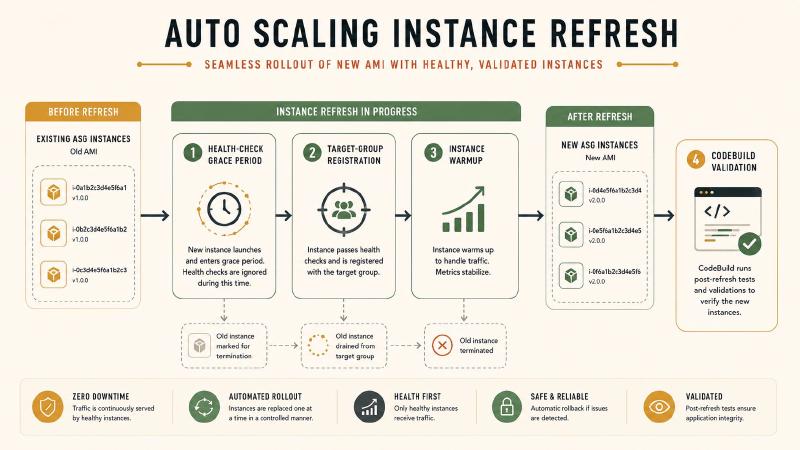
Health-Check Grace Period#
New instances need enough time to initialize before Auto Scaling interprets health failures as permanent.
The grace period should be based on observed startup behavior rather than an arbitrary large number.
A grace period that is too short causes churn.
A grace period that is too long allows broken instances to remain in the deployment process longer than necessary.
Instance Warmup#
A newly healthy instance may not immediately be ready for full production load.
It may still be:
- Warming application caches.
- Completing Magento initialization.
- Starting observability agents.
- Building local runtime state.
- Stabilizing CPU and memory use.
The deployment process should account for warmup before declaring the backend rollout complete.
Mixed AMI Fleets#
A smoke test against the public API hostname may hit different instances on each request.
That is why the backend health response should include release metadata and why the smoke test should sample it repeatedly.
A single successful response does not prove that every target in the fleet uses the expected AMI.
Public Versus VPC-Connected Tests#
If all smoke-test endpoints are public, the CodeBuild projects may not need VPC configuration.
That is the simplest option, but it validates the public route rather than the origin in isolation.
A public test can prove:
- Public DNS works.
- TLS works.
- The edge proxy works.
- Public routing works.
- The application serves an external client.
A VPC-connected test can reach:
- Internal load balancers.
- Private listeners.
- Private API endpoints.
- Origin-only validation routes.
- Services that should not be exposed publicly.
- A new deployment before public traffic reaches it.
Example VPC configuration:
| |
A VPC-connected CodeBuild project also needs:
- Correct security-group rules.
- Private DNS resolution.
- Routes to the target service.
- NAT or VPC endpoints for any required external services.
- IAM permissions for network-interface management.
A strong design can use two validation layers:
| |
The first validates the deployment.
The second validates the customer path.
Authenticate Smoke-Test Endpoints#
Some smoke-test endpoints should not be publicly callable without authentication.
Options include:
- A short-lived signed token.
- A dedicated API token stored in Secrets Manager.
- AWS IAM authentication for an internal endpoint.
- A request signature verified by the application.
- Mutual TLS.
- Network restrictions around a private listener.
- A narrowly scoped Cloudflare service token.
Example:
| |
The token must never be printed.
Be careful with shell tracing:
| |
Do not enable it around commands that contain secrets.
Make Failures Useful#
A test that reports only exit status 1 creates extra work during a deployment incident.
Every failure should identify:
- Which pipeline failed.
- Which endpoint failed.
- What was expected.
- What was received.
- Which release was under test.
- Which image or AMI was deployed.
- When the test ran.
- Which pipeline execution initiated it.
Useful output looks like this:
| |
That tells me immediately that:
- The API is reachable.
- At least one target has the expected release.
- The fleet is still mixed or the deployment did not complete correctly.
That is far more useful than:
| |
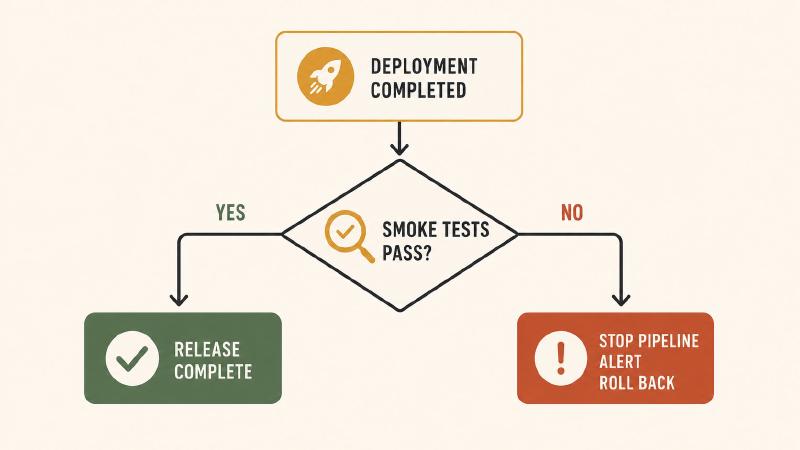
Decide What Failure Means#
A failed smoke-test action stops its own pipeline.
It does not automatically repair production unless I explicitly build that behavior.
There are three common failure policies.
Policy 1: Stop and Alert#
The pipeline fails and sends an alert.
An engineer decides whether to:
- Retry.
- Investigate.
- Roll back.
- Continue manually.
This is the safest first implementation while the test suite is new.
Policy 2: Automatic Rollback#
A failed smoke test invokes an automated rollback process.
This is appropriate when:
- Rollback has been tested.
- The previous deployment state is recorded.
- Database changes are backward-compatible.
- The smoke tests have a low false-positive rate.
- The deployment mechanism can safely revert.
- The rollback process is observable.
Policy 3: Prevent Traffic Shift#
With a blue/green or test-listener design, smoke tests run against the replacement environment before production traffic moves.
This is the strongest design because a failed test prevents the release from becoming customer-facing.
It also requires more deployment infrastructure and more explicit traffic-management logic.
Frontend Rollback#
For ECS, rollback may restore the previous task definition:
| |
The pipeline should record the actual previous task-definition ARN before deployment.
Do not assume that the previous revision is numerically one less than the current revision.
Backend Rollback#
For the backend, rollback may restore the previous launch-template version and redeploy the prior AMI:
| |
The exact replacement command depends on the deployment mechanism used by the backend pipeline.
The important point is that the pipeline must record:
- The previous AMI ID.
- The previous launch-template version.
- The current Auto Scaling configuration.
- The deployment state required to restore service.
Do not calculate the previous launch-template version by subtracting one.
Record the actual previous deployment state.
What Not to Put in a Smoke Test#
Smoke tests should remain fast and deterministic.
I avoid checks that:
- Place real orders.
- Modify inventory.
- Send email or SMS.
- Create permanent customer accounts.
- Trigger fulfillment.
- Depend on frequently changing product data.
- Require a large dataset.
- Run for twenty minutes.
- Duplicate the full integration-test suite.
- Fail because analytics scripts are blocked.
- Depend on exact HTML markup that changes frequently.
- Require nonessential third-party marketing services.
- Perform expensive full-catalog searches.
- Write to production dependencies unless cleanup is guaranteed.
A smoke test is a release gate, not a complete quality-assurance environment.
A Better Testing Strategy for Both Pipelines#
I organize tests according to when they provide the most useful signal.
Before Packaging#
Run:
- Static analysis.
- Linting.
- Type checking.
- Unit tests.
- Dependency checks.
- Security scans.
Before Frontend Deployment#
Run:
- Next.js build validation.
- Component tests.
- Contract tests.
- Container scanning.
- Staging integration tests.
Before Backend Deployment#
Run:
- Composer validation.
- Magento compilation checks.
- PHP static analysis.
- Module tests.
- AMI build validation.
- Required-extension checks.
- Staging integration tests.
After Frontend Deployment#
Run:
- Dynamic frontend health.
- Release-version validation.
- Origin route validation.
- Public customer-path validation.
- Product or category page validation.
- Next.js-to-Magento validation.
After Backend Deployment#
Run:
- Magento health.
- Readiness checks.
- Release-version validation.
- RDS connectivity.
- Redis or Valkey connectivity.
- OpenSearch connectivity.
- Representative GraphQL query.
- Public or internal API validation.
Each layer should catch a different category of problem.
Common Failure Modes#
The Smoke Test Starts Too Early#
The deployment action finishes before tasks or instances are fully ready.
Fix: Explicitly wait for ECS service stability or backend deployment completion before starting functional smoke tests.
Cloudflare Serves Cached Content#
The public page succeeds because cached content masks a broken origin.
Fix: Test an uncacheable dynamic route and perform a separate origin validation.
Cloudflare Blocks CodeBuild#
The edge classifies deployment validation as bot traffic.
Fix: Use an authenticated smoke-test route, service token, signed header, or controlled skip rule. Keep the exception narrow.
Only Some Frontend Tasks Use the New Release#
Repeated requests return different frontend versions.
Fix: Sample the version endpoint multiple times and confirm ECS finished replacing the old tasks.
Only Some Backend Instances Use the New AMI#
Repeated API requests return different release versions.
Fix: Verify launch-template versions, deployment completion, target-group membership, and repeated runtime metadata.
The Health Endpoint Is Too Shallow#
The endpoint returns 200 whenever the process is running even though required dependencies are unavailable.
Fix: Add a separate readiness endpoint with lightweight dependency checks.
The Health Endpoint Is Too Deep#
Every ALB health check performs expensive RDS and OpenSearch operations.
Fix: Keep load-balancer liveness shallow. Put controlled dependency validation in readiness or pipeline-specific smoke tests.
The Test Depends on Mutable Merchandising Data#
A product is disabled, renamed, removed, or moved.
Fix: Use controlled smoke-test data with stable identifiers.
CodeBuild Cannot Reach a Private Endpoint#
The project has incorrect VPC, subnet, route, DNS, or security-group configuration.
Fix: Validate VPC attachment, private DNS, security-group rules, NAT, and required VPC endpoints.
A Secret Appears in the Logs#
A script echoes an environment variable or enables shell tracing.
Fix: Never print secrets, disable tracing around authenticated requests, and sanitize errors.
A Third-Party Outage Blocks Every Deployment#
The smoke test depends on a nonessential analytics, advertising, or marketing provider.
Fix: Test only dependencies required to serve the critical application path.
The Buildspec References Reports That Do Not Exist#
The buildspec declares JUnit files, but the shell scripts never create them.
Fix: Remove report configuration from the shell-only version. Add it only after adopting a framework that emits structured reports.
Production Hardening#
Once the baseline pipeline is working, I would add several improvements.
Structured Test Reports#
Move the tests into a framework such as:
- Playwright.
- pytest.
- A JUnit-compatible API test runner.
Structured reports make failures easier to review and trend.
CloudWatch Metrics#
Publish custom metrics such as:
| |
These help distinguish deployment failures from wider production problems.
EventBridge Notifications#
Send CodePipeline or CodeBuild failures to:
- Amazon SNS.
- Slack.
- Microsoft Teams.
- PagerDuty.
- An incident-management Lambda.
The alert should include:
- Pipeline name.
- Execution ID.
- Application.
- Commit SHA.
- Container digest or AMI ID.
- Failed test.
- CodeBuild log link.
- Deployment environment.
Separate Tests by Environment#
Use the same scripts with environment-specific configuration.
Frontend:
| |
Backend:
| |
The test logic remains the same. Only configuration changes.
Keep Pipeline Ownership Clear#
The frontend pipeline owns:
- Next.js deployment validation.
- Fargate release validation.
- Public storefront validation.
- Next.js-to-Magento validation.
The backend pipeline owns:
- AMI deployment validation.
- Magento runtime validation.
- Dependency readiness.
- Direct GraphQL validation.
That avoids building one oversized test stage that is unclear about which deployment caused a failure.
Final Frontend Pipeline#
| |
Final Backend Pipeline#
| |
Final Thoughts#
A deployment pipeline should not stop at:
AWS accepted the deployment.
It should continue until it can answer:
The new release is serving traffic, its critical dependencies are available, and the application path that matters still works.
For the frontend, that means validating the newly deployed Next.js tasks, the public storefront, and the connection from Next.js to Magento.
For the backend, that means validating the newly deployed Magento AMI fleet, the PHP runtime, required dependencies, and a representative GraphQL request.
The two pipelines are independent because the applications are independent.
They use different artifacts.
They use different deployment mechanisms.
They have different failure modes.
They should have different smoke tests.
The first version does not need to be elaborate.
Start with a few high-value checks.
For the frontend:
- Is the expected Next.js release serving?
- Can the application serve a dynamic route?
- Can Next.js reach Magento?
- Does the public customer path work?
For the backend:
- Is the expected Magento release serving?
- Can Magento reach RDS, cache, and search?
- Does a representative GraphQL query return valid data?
Those checks are inexpensive, but they close one of the most dangerous gaps in continuous delivery: the difference between a deployment that finished and a release that actually works.