I do not treat my Linux desktop like a toy anymore.
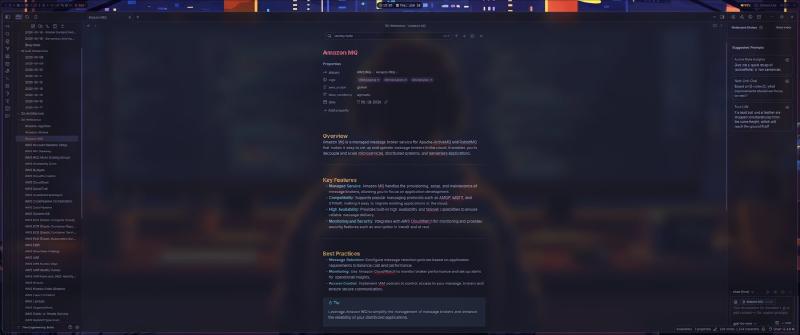
That does not mean I do not care how it looks. I absolutely do. I want my desktop to look sharp, modern, dark, readable, and intentional. I want my terminal, status bar, launcher, lock screen, and editor to feel like they belong to the same system.
But the real goal is bigger than aesthetics.
My Arch + Hyprland setup is built around one idea:
My desktop should be reproducible infrastructure.
If I wipe my laptop tomorrow, I should not have to spend a weekend trying to remember which packages I installed, which config files I edited, which environment variables fixed screen sharing, or which script made my monitors behave correctly.
I should be able to redeploy my workstation.
That mindset changes everything.
Instead of a random pile of dotfiles, my desktop becomes something closer to a small platform:
- version-controlled configuration
- modular Hyprland files
- wallpaper-driven theming
- repeatable package installation
- machine-specific monitor templates
- shared keybindings across systems
- explicit handling for Wayland quirks
- scripts for the small things I do constantly
This is the same way I think about infrastructure at work. If a process matters and I will repeat it more than once, it should eventually become documented, automated, or reproducible.
My desktop is no different.
The Goals Behind the Setup#
There are plenty of ways to run Linux.
I did not choose Arch and Hyprland because it is the easiest path. I chose it because I wanted control without dragging around a full desktop environment that makes assumptions for me.
The main goals were:
- Full rebuildability
- Keeping multiple machines in sync
- Readable wallpaper-based theming
- Aesthetic consistency
- Low bloat
- Wayland-native tooling
- A workflow that feels fast all day
The rebuildability piece is the most important.
I use more than one machine. My desktop and laptop need to feel like the same environment. I do not want one machine to have a different launcher, different keybinds, different fonts, missing scripts, or a slightly broken terminal theme.
That kind of drift is annoying in cloud infrastructure.
It is just as annoying on a workstation.
The second big goal was theming. I like changing wallpapers, but I do not want to manually retheme my entire desktop every time I do it. The color system should follow the wallpaper automatically while still keeping text readable.
That is where tools like pywal, swww, and matugen fit into the workflow.
The wallpaper is not just decoration. It becomes an input into the theme pipeline.
Current Machine Context#
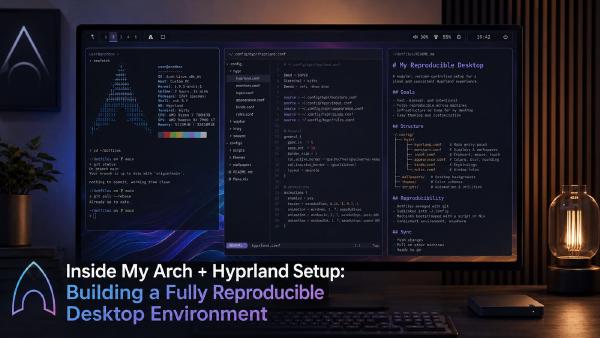
The machine shown in this setup is my System76 Gazelle laptop running Arch Linux and Hyprland.
The current environment looks roughly like this:
| |
The hardware is also important because it influences some of the design decisions.
This laptop has hybrid graphics:
| |
That matters because Wayland behavior can vary depending on whether I am on Intel, AMD, or NVIDIA hardware. Some of my machines are smoother than others. Some need different environment variables. Some behave differently with external monitors. Some make screen sharing more painful.
So the config cannot assume every machine is identical.
That is one of the biggest reasons I separate shared configuration from machine-specific configuration.
The Architecture of the Desktop#
The biggest improvement I made was thinking about the desktop as a set of layers.
| |
That structure helps keep the config clean.
When something breaks, I want to know where it belongs.
If the issue is screen sharing, I am looking at PipeWire, portals, the browser, and Hyprland.
If the issue is colors, I am looking at the theme pipeline.
If the issue is an external monitor, I am looking at monitor templates and enforcement scripts.
If the issue is a floating window, I am looking at window rules.
This is much easier to troubleshoot than one giant hyprland.conf file with everything thrown into it.
Cleaning Up the Hyprland Config Structure#
My Hyprland config is modular, but the naming matters.
It is very easy for a Linux config directory to slowly turn into a junk drawer:
| |
That works, but it does not read cleanly.
For a reproducible setup, I want names that are boring, predictable, lowercase, and obvious.
The cleaned-up structure I prefer is:
| |
That structure gives every file a clear job.
The main hyprland.conf becomes the entrypoint:
| |
That is the whole point.
The root config should explain the system at a glance. It should not contain every detail.
Module 1: Environment#
Wayland, Electron apps, browsers, NVIDIA, and portals all care about environment.
I keep those settings isolated because they are one of the easiest places to create machine-specific problems.
| |
For NVIDIA-specific machines, I would keep the values separate or generated through a template:
| |
I avoid dumping NVIDIA settings into the shared config unless they are genuinely safe for every machine.
That is the broader rule:
Shared config should be boring. Machine-specific config should be explicit.
Module 2: Input#
Input settings deserve their own file because laptops and desktops are different.
A laptop has a touchpad. A desktop may not. Mouse sensitivity may differ. Natural scrolling may make sense on one machine and not another.
| |
I like keeping this simple.
Most of the time, input problems are felt immediately. If this file is clean, it is easy to adjust after a rebuild.
Module 3: Keybinds#
Keybinds are where consistency matters the most.
Once muscle memory develops, the machine should disappear. I should not have to think about whether I am on my desktop or laptop.
| |
The names matter here too.
I would rather have:
| |
than:
| |
The cleaner names read like commands.
That makes the whole setup easier to understand later.
Module 4: Monitors#
Monitors are where Linux desktop configs often get ugly.
My laptop setup includes:
| |
A direct Hyprland config for that machine might look like this:
| |
This works, but it should not be globally shared across every system.
The better pattern is to treat monitor layout as machine-specific infrastructure.
In the dotfiles repo, I would structure it like this:
| |
Then hyprland.conf.tmpl can source the right monitor file:
| |
This is the difference between dotfiles and workstation infrastructure.
Dotfiles are copied.
Infrastructure adapts.
Monitor Enforcement#
External monitor behavior is one of those things that can work perfectly for weeks and then randomly come up wrong after a reboot, dock change, driver update, or sleep/wake cycle.
So I like having an explicit monitor enforcement script.
| |
Then bind it:
| |
This is not fancy.
It is practical.
And practical is what makes a desktop usable every day.
Module 5: Theme#
The theme file is generated from the wallpaper pipeline.
The goal is not just matching colors. The goal is readable matching colors.
A wallpaper can generate a beautiful palette that is terrible for text. I care more about contrast than novelty.
A clean generated Hyprland theme file might look like this:
| |
Waybar can consume the same palette through CSS:
| |
The important thing is that Hyprland, Waybar, Rofi, Kitty, Ghostty, and other tools should not each invent their own colors.
The theme should have a source of truth.
Wallpaper as a Theme Source#
Changing wallpapers should update the desktop, not create more manual work.
A cleaned-up wallpaper script might look like this:
| |
Then generate-theme can be responsible for writing the generated files:
| |
I like this pattern because it creates a clean boundary:
- scripts generate the theme
- Hyprland consumes the theme
- Waybar consumes the theme
- the wallpaper remains the input
No manual color chasing.
Module 6: Window Rules#
Window rules are what make Hyprland feel like a real daily-driver environment instead of just a compositor.
Some windows should tile.
Some should float.
Some should center.
Some should pin.
Some should open on specific workspaces.
A cleaned-up window-rules.conf might look like this:
| |
I do not want every app to require manual placement.
Some windows have obvious homes. The config should know that.
Module 7: Animations#
Animations are easy to overdo.
I want the desktop to feel polished, not theatrical.
| |
The goal is simple:
- fast enough to feel responsive
- smooth enough to feel modern
- subtle enough to stay out of my way
A desktop used for actual work should not feel like it is constantly showing off.
Module 8: Autostart#
Autostart should be boring and explicit.
| |
I do not like mystery startup behavior.
If something starts with my session, I want to know where it starts and why.
Waybar: The System Dashboard#
Waybar is not just decoration.
It is the dashboard for the desktop.
I want to see enough information to understand the state of the machine without opening extra apps:
- workspaces
- focused window
- network
- audio
- battery
- date/time
- tray
- notifications
- maybe CPU and memory
A clean Waybar structure looks like this:
| |
colors.css is generated by the wallpaper/theme pipeline.
style.css defines the actual appearance.
config.jsonc defines the modules.
Example:
| |
And the style:
| |
The bar should be useful first and pretty second.
The best status bar is the one that gives me context without demanding attention.
Terminal Workflow: Ghostty, Kitty, Zsh, and Starship#
Most of my real work happens in the terminal, so the terminal setup matters.
I use Zsh with Starship, and I currently have both Ghostty and Kitty available. Ghostty is my primary terminal right now, but I like having Kitty installed as a fallback.
The terminal needs to be:
- fast
- readable
- consistent with the desktop theme
- good with Nerd Fonts
- predictable across machines
Starship is useful because it gives me context without a giant prompt.
For DevOps work, I care about things like:
- current directory
- Git branch
- Git status
- AWS profile
- Docker context
- command duration
Example:
| |
The AWS profile piece is especially important.
I do not want to guess which AWS account or profile I am pointed at. That is how mistakes happen.
The prompt should make important context visible.
Screen Sharing on Wayland#
Screen sharing is one of the biggest practical issues with a Hyprland workstation.
On Wayland, applications do not just get unrestricted access to the screen. That is good for security, but it means screen sharing depends on the correct portal and PipeWire stack.
The chain looks like this:
| |
The packages that matter are:
| |
When screen sharing breaks, I start here:
| |
If the services are running but screen sharing is still acting weird:
| |
Then I restart the browser or Teams.
The annoying part is that Teams, Firefox, Chrome, and Electron apps can behave differently. A setup can work perfectly in one app and fail in another.
That is why screen sharing is part of my rebuild checklist.
I do not consider a workstation rebuild complete until screen sharing works.
Clipboard Issues on Wayland#
Clipboard behavior is another area where Wayland can feel different from X11.
I use wl-clipboard:
| |
Basic test:
| |
The basic tools usually work fine.
The pain tends to show up between browsers, Teams, Electron apps, and native Wayland applications.
A better setup includes clipboard history:
| |
Then autostart:
| |
And bind a picker:
| |
That gives me a way to inspect and recover clipboard history instead of treating the clipboard like invisible magic.
For a work machine, that matters.
Screenshots with grim and slurp#
Screenshots are part of my daily workflow.
I use them for documentation, bug reports, notes, blog posts, and quick visual references.
The Wayland-native stack is simple:
| |
A cleaned-up screenshot script:
| |
Keybind:
| |
Simple, reliable, and easy to remember.
Locking and Idle Management#
I use Hyprlock and Hypridle for locking and idle behavior.
The goal is:
- lock the session after inactivity
- turn off displays after a longer idle period
- restore displays cleanly
- avoid weird resume behavior
Example:
| |
The lock script stays boring:
| |
I do not want my lock behavior buried in a giant config file. It is important enough to be obvious.
Handling Node Version Managers and GUI Apps#
One of the more annoying issues I have run into is environment mismatch between terminal apps and GUI apps.
In a terminal, my shell loads Zsh config, initializes tools like fnm or mise, and everything works.
But GUI apps launched from Hyprland do not always inherit the same environment as an interactive shell.
That can create weird issues with Node-based workflows, editor integrations, or tools that expect a specific runtime path.
My shell config might include:
| |
That works for interactive shells.
But for session-level environment, I prefer to make important values explicit through Hyprland environment config or systemd user environment imports.
Example:
| |
This is not the most glamorous part of the setup, but it is important.
A desktop environment is not just windows and wallpapers. It is also the environment your tools inherit.
Package Bootstrapping#
A reproducible desktop needs an explicit package list.
For the core desktop, I would start with:
| |
For AUR packages:
| |
I do not think everyone should copy my exact package list.
The more important point is that the package list exists.
A rebuild should not depend on memory.
Where Chezmoi Fits#
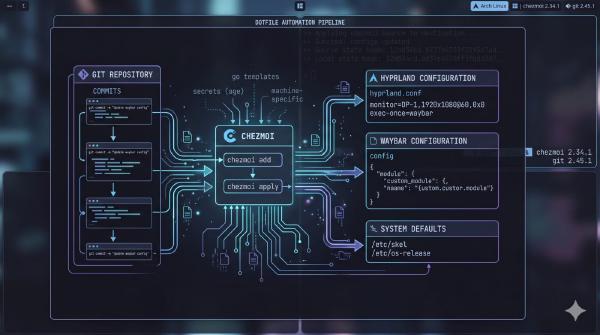
Chezmoi is what turns the whole setup into something I can safely sync across machines.
The dotfiles repo should separate shared files, generated files, templates, and machine-specific logic.
A clean repo structure might look like this:
| |
The monitor selection can be templated:
| |
Package installation can also be templated:
| |
The rule is simple:
- shared config goes in Git
- secrets stay private
- machine-specific values are templated
- generated files are either ignored or clearly marked
- rebuild steps are scripted
That is how the desktop stays manageable.
Performance and UX Tuning#
A pretty desktop is useless if it feels slow.
My priorities are:
- low input latency
- fast launcher
- readable text
- reliable screen sharing
- predictable monitor behavior
- consistent keybinds
- no unnecessary background noise
I like blur, animations, rounded corners, Nerd Fonts, and polished Waybar modules.
But I do not want the desktop to feel like it is performing a magic trick every time I open a terminal.
The best Hyprland setup is one that feels quiet.
It should look good, respond quickly, and stay out of the way.
Gotchas I Had to Work Around#
This is the part that matters more than the screenshots.
Screen Sharing Is Still the Big One#
Wayland screen sharing depends on portals and PipeWire.
If Teams or a browser cannot share the screen, check the portal stack before wasting time randomly changing Hyprland settings.
| |
Restarting portals often fixes weird behavior:
| |
NVIDIA Needs Its Own Lane#
NVIDIA can work well, but it still needs special care.
I avoid mixing NVIDIA-specific assumptions into the shared config. If a setting only applies to NVIDIA, it belongs in a machine-specific file or template.
This matters even more when syncing dotfiles between machines with different GPUs.
Clipboard Behavior Can Be Weird#
Clipboard issues show up most often between Teams, Firefox, Chrome, and Electron apps.
The basic wl-copy and wl-paste tools are essential, but adding cliphist makes the clipboard easier to inspect and recover from.
GUI Apps Do Not Always Inherit Your Shell#
If Node, npm, pnpm, fnm, or mise work in the terminal but not in a GUI app, the issue may be environment inheritance.
Do not assume .zshrc fixes everything.
Session-level environment matters.
External Monitors Need a Recovery Path#
Docking, undocking, sleep, wake, and GPU behavior can all affect monitors.
Having an enforce-monitors script gives me a fast recovery path instead of manually fighting display layout every time something comes up wrong.
What I Still Want to Improve#
The setup is reproducible, but it is not finished.
Linux desktops are never really finished.
The next things I want to improve are:
- cleaner machine-specific monitor templates
- better clipboard history integration
- stronger first-run bootstrap scripts
- more deterministic wallpaper theme generation
- better documentation for each helper script
- fewer overlapping tools where I currently have duplicates
- a rebuild checklist that validates screen sharing, audio, monitors, and clipboard behavior
The goal is not perfection.
The goal is to make the setup easier to rebuild, easier to understand, and easier to trust.
Final Thoughts#
Arch and Hyprland are not the easiest way to run a Linux desktop.
That is fine.
I am not optimizing for easiest. I am optimizing for control, speed, reproducibility, and a desktop that feels like mine.
The difference between a fragile rice and a real workstation setup is discipline.
A fragile rice looks good in screenshots.
A real workstation survives rebuilds.
That is what I want from my desktop. I want the wallpaper, colors, terminal, status bar, keybinds, monitors, scripts, and applications to work together as one reproducible system.
If I wipe the machine, I should not feel like I lost my setup.
I should feel like I am redeploying it.
My Linux desktop is not just a collection of dotfiles.
It is infrastructure.